Participant
April 14, 2022
Answered

V23.3 Renders entire layer white when any operation initiated

  • April 14, 2022
  • 2 replies
  • 1166 views

Photoshop update version 23.3 Windows 10, 64-bit operating system, x64-based processor, 16 gig RAM. Installed update then opened program and opened a photo - looked fine until I opened another photo, then copied and pasted that photo into a layer in the first photo document. The 2nd photo layer is completely white, but when I look at the Layer menu it shows the photo in the middle of a transparent field. When I mouse over the white layer, I can locate the dotted outline of where the photo should be - but it is completely covered with a white surface. If I make a copy of the imported transparent layer from the layer menu it creates another completely white layer. If I copy the base layer from the layer menu - the copied layer is completely white. The program worked fine before the update.
This topic has been closed for replies.
Correct answer Ged_Traynor

Hi

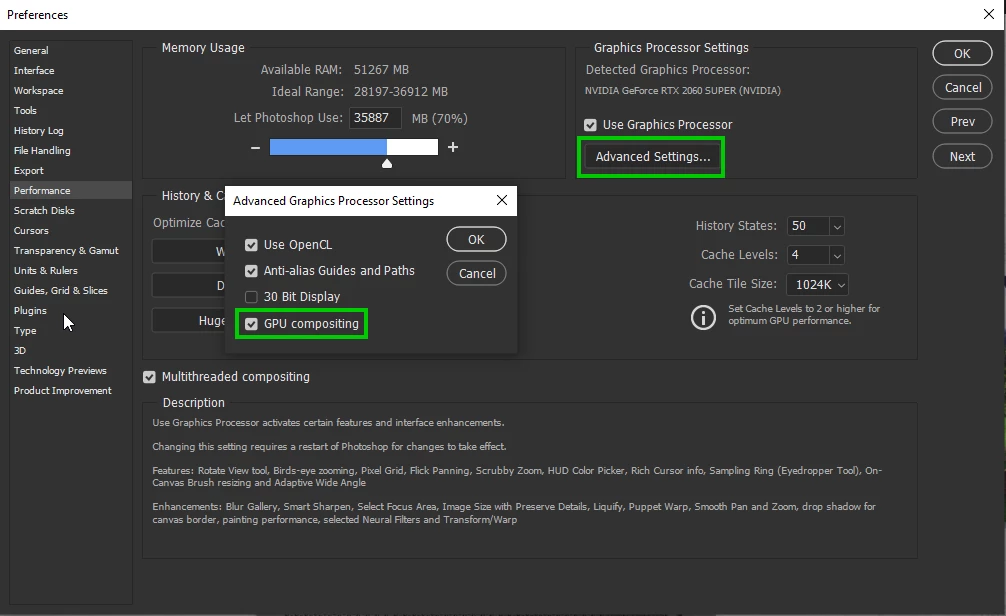
Try unchecking this option in preferences and restarting Photoshop to see if it helps

2 replies

Ged_Traynor
Community Expert
Ged_TraynorCommunity ExpertCorrect answer
Community Expert
April 15, 2022

Hi

Try unchecking this option in preferences and restarting Photoshop to see if it helps

Participating Frequently
April 15, 2022

So far... That seemed to work!  Thank you


For us not professionally trained users... What did I do by unchecking GPU compounding?


Thank you

davescm
Community Expert
Community Expert
April 15, 2022

Compositing in the past used the CPU. With that option checked (it is new in this update) it uses the GPU which should give performance gains going forward. However if your GPU causes issues then it can be unchecked.


You might though want to update your GPU drivers then try checking it again.


Dave

Participating Frequently
April 14, 2022

Yes Sir!   Same thing.

When I open a flatened  image, all is well.  Image is visible.  Image is a background.  When I change it to a working layer, area turns white.  Exact same issues as above.

This began with the update,  first the transform tool dissappeared, followed by the white on any files and all layers if not background.

I have tried reboot.   I have completely removed PS and reinstalled.  Same problem.

PS is basically useless right now.

Participating Frequently
April 14, 2022

One additional item.

I open an image as a background.  Image is visible,  When I change the image to a layer,  image turns white.

If I flatten the white layer,  the image becomes background and is once again visible.

Help...   Need this thing for work!