
Gabarito
Known Participant
February 5, 2018
Answered

Variable for Layer name and use in Actions

  • February 5, 2018
  • 3 replies
  • 7865 views

Hi everyone.

I'm doing a sequence of numbers to show a countdown counter, in the shape of those digital clock plates.

Like this:
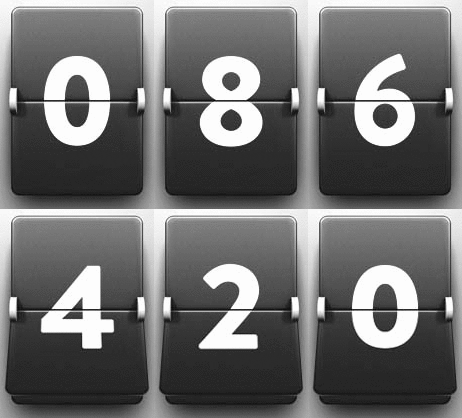
  Contador1-segundo.gif

Since there are 10 numbers and several frames of each number to do the animation, I thought about creating a sequence of actions.

I created the actions for one number and would like to apply it to the remaining nine ones.

But I came across a serious impediment: the actions use the name verbatim of each layer and do not lend themselves to be applied in the other layers.

For example, I created layer 9 that will transition to layer 8.

I made transformations in layer 9, made selections and made copies of layer 8.

If I apply this to layer 1, of course it will not work, because the action will look for layers 9 and 8.

Searching, I found references to using variables in the Image menu.

But from what I could understand, those variables will not be useful to me.

I was looking for something that would do the actions in layers that were referenced by variables and not by the name of each layer.

In a manner that I only had changed the variable by its-turn layers, applying the actions generically on layers 1 and 2, then 2 and 3, and so on.

Attached are a template file and my palete of Actions for colleagues to take a look at what I'm doing.

Thank you for any suggestion and/or change of procedure.

Because I'm not a Photoshop expert, I may be going down a more complicated path than I would have thought.

Incidentally, I even ask for an opinion about the transformations that I made trying to simulate a 3-D board turn.

As I said before not being an expert, it is only today that I "discovered" the 3D features of the program.

Who knows what animation I'm trying to do would be better represented by using this feature?

Waiting suggestions.

Thank you.

Files attached:

Plates

Palette

================================

Guidance on how to use Actions:

Open the Plates.psd file

Perform Action "Number Only"

Execute Action "Style 1 - Bold"

Perform Action "Center"

Perform Action "Detach in the middle"

Perform Action "Make Plates"

Perform Action "Transformation"

--------------------------------------------------------------

This topic has been closed for replies.
Correct answer Chuck Uebele

There is a plugin called ScriptListener that will record what you do, much like an action. I will put the code in a log file on your desk top. So it just a matter of copying the code to your script, and filling in some other commands to make sure the correct layer is selected.

3 replies

Gabarito
GabaritoAuthor
Known Participant
February 7, 2018

Editing script, I'm changing layer names and move position in a way to achieve what I want: transform all plates with numbers to make an animation.

Script is working as expected.

I may say the thread is solved.

But my solution is very ugly because I have to copy a block with 983 lines for each plate number.

And adjust variables like layer name and move position among too many javascript commands and other variables.

That is leading me to get a final script with almost 10,000 lines!

So, I ask collegues if someone know how to use loops and conditionals to work with just one block, like this:

number := 9

while number >= 0 do

     TransformLayer(number)

     AdjustLayerPosition(number)

     dec(number)

end while

(LayerPosition is when I have to move layers)

This way, I'd have just one block of code and no needs to adjust each single variable.

I realized that I can reuse the same name for variables desc and ref, created by ScriptListener without problem.

Higher numbers are desc78 and ref61.

Because the whole code is very big, I won't copy it here.

But you can have a look in almost a half of it here (numbers 9, 8, 7 and 6).

Chuck Uebele
Community Expert
Community Expert
February 7, 2018

While loops can be tricky in that if something goes wrong, the keep going forever. Best to use a for loop. Like this if you want to cycle through the layers, which will only loop the number of layers in the document.

var doc = activeDocument;

for(var i = 0;i<doc.layers.length;i++){

     //your code here

     }

There are lots of ways to keep track of the layers, id numbers, names, etc. You can push all the layers into an array to keep tract of them if they are moved:

var doc = activeDocument;

var layerArray = new Array()

var doc = activeDocument;

for(var i = 0;i<doc.layers.length;i++){

     layerArray.push(doc.layers);

     }

//Then you can reference the layers by their original order:

doc.activeLayer = layerArray[3];

The action manager code produces a lot of junk code so make sure you copy only the code that you really need. You can replace the variables in the code by using functions that replace the values of the variables. Lets say you want to do the same thing to many different layers. Using the above code that put the layers into an array, you could do this, which keeps the amount of repetitive code to a minimum :

doSomthing(layerArray[2])

function doSomething(setLayer){//setLayer is given the value of layerArray[2] when it's call in line 1

     doc.activeLayer = setLayer

     //other code here

     }

Gabarito
GabaritoAuthor
Known Participant
February 7, 2018

Yes, I'm cleaning what is unnecessary.

About advices for advanced programming, using arrays, for loops and keep track of all other variables and so on, I'm afraid it is beyond my skills and needs.

I could make a functional script that is doing fine the job.

For those who want to test and play, there is a template here.

And script for numbers from 9 to 1 is here.

Just to open the template and run the script.

I want to say thanks to the valuable mates who helped me with my questions.

Although the final solution is not too much elegant nor pretty, with loops and nested procedures, it's working very well.

It's enough.

So, we can consider the thread fully SOLVED.

Thank you all.

Chuck Uebele
Community Expert
Community Expert
February 6, 2018

Here's an example of using a script to run a series of actions on all the layers of a file:

#target photoshop

var doc = activeDocument;//sets the variable "doc" as a reference to the current active document

//names of actions you want to run

var action1 = 'My first action'

var action2 = 'My second action'

var action3 = 'My third action'

for(var i=0;i<doc.layers.length;i++){//loop to run through all layers of a file. a test could be added to check for type of layer to include or exclude

    doc.activeLayer = doc.layers;//sets the current active layer starting at the top most layer.

    myAction_1 (action1)//calls the function to run an action and puts in the action name you want to run

    myAction_1 (action2)

    myAction_1 (action3)

    }

function myAction_1(actionName){ //unction to run an action.

    var idPly = charIDToTypeID( "Ply " );

        var desc4 = new ActionDescriptor();

        var idnull = charIDToTypeID( "null" );

            var ref1 = new ActionReference();

            var idActn = charIDToTypeID( "Actn" );

            ref1.putName( idActn, actionName );//exchanged name of action for a variable that can be changed when the function is called

            var idASet = charIDToTypeID( "ASet" );

            ref1.putName( idASet, "Chuck actions" );//this would be the group name of where your actions are located

        desc4.putReference( idnull, ref1 );

    executeAction( idPly, desc4, DialogModes.NO );  

    }

Gabarito
GabaritoAuthor
Known Participant
February 6, 2018

I'll try your example too.

But my plans is to run step by step all actions and, later, try to adapt ScriptListener Log to change layer names and apply to all 10 numbers at once.

JJMack
Community Expert
Community Expert
February 5, 2018

Actions are hard code Photoshop steps as you know.  If you want to use logic and variables you need to use Photoshop Scripting.  The best choice of supported languages is JavaScript and there is a Photoshop Scripting forum you can ask for advice in. Photoshop Scripting

JJMack
Gabarito
GabaritoAuthor
Known Participant
February 5, 2018

Thank you, JJMack.

As you say, there is no way to apply those Actions to other layers without using scripting?

I was trying to make some Actions to current layer, instead of using layers names, but It's not possible, I guess.

Any idea?

Chuck Uebele
Community Expert
Chuck UebeleCommunity ExpertCorrect answer
Community Expert
February 5, 2018

There is a plugin called ScriptListener that will record what you do, much like an action. I will put the code in a log file on your desk top. So it just a matter of copying the code to your script, and filling in some other commands to make sure the correct layer is selected.