November 4, 2020
Answered

Varying Image Display Issue Across Multiple PC's - Photoshop 2021

  • November 4, 2020
  • 4 replies
  • 392 views

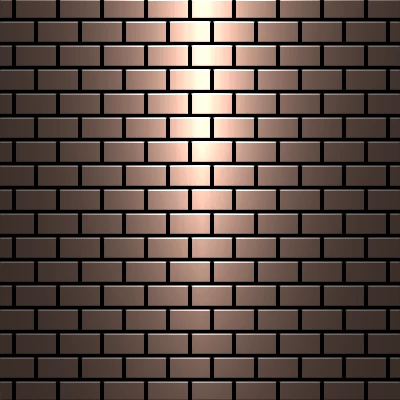
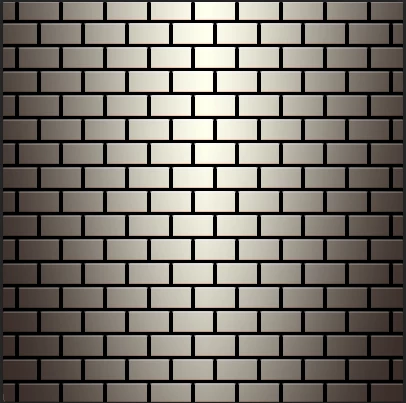
I am currently trying to solve an issue where a test image using Color Dodge display's fine on some PC's but incorrectly on others.

As some of the PC's have Nvidia GTX graphics cards, while others have Nvidia RTX graphics cards, I thought it might be a driver issue.

Have tried uninstalling / cleaning graphics drivers and installing the latest graphics driver.

Also tried uninstalling Photoshop and reinstalling it.

So far the issue persists and I cannot find the cause.

If anyone can assist me and tell me what the issue may be, it would be greatly appreciated.


Have attached reference images and a sample PSD file to this post.


Correct Image
 

Incorrect Image
 

This topic has been closed for replies.
Correct answer

The issue has been solved.

Found out why the image displayed properly on *some* PC's with Photoshop 2021 and not others.

In previous versions of Photoshop (2020, 2019) there was a setting called "Legacy Compositing".

This option is no longer available in Photoshop 2021.

When a PC with an older version of Photoshop was upgraded to Photoshop 2021 via Creative Cloud,

there is an option to keep or migrate your current Photoshop settings. The old setting of "Legacy Compositing" was turned on at the time of the upgrade and the setting value was migrated to Photoshop 2021, which still recognizes the setting internally.

So, the reason the image displayed properly sometimes was because Photoshop 2019 got updated to 2021, and the Legacy Compositing setting was turned on at the time and the setting got migrated to Photoshop 2021.

4 replies

Correct answer
November 10, 2020

The issue has been solved.

Found out why the image displayed properly on *some* PC's with Photoshop 2021 and not others.

In previous versions of Photoshop (2020, 2019) there was a setting called "Legacy Compositing".

This option is no longer available in Photoshop 2021.

When a PC with an older version of Photoshop was upgraded to Photoshop 2021 via Creative Cloud,

there is an option to keep or migrate your current Photoshop settings. The old setting of "Legacy Compositing" was turned on at the time of the upgrade and the setting value was migrated to Photoshop 2021, which still recognizes the setting internally.

So, the reason the image displayed properly sometimes was because Photoshop 2019 got updated to 2021, and the Legacy Compositing setting was turned on at the time and the setting got migrated to Photoshop 2021.

D Fosse
Community Expert
Community Expert
November 10, 2020

Interesting. Thanks for reporting back.

D Fosse
Community Expert
Community Expert
November 5, 2020

There is one recent change in Photoshop: Apparently OpenGL is no longer used. Now it's handled by DirectX in Windows, Metal in MacOS.


The clue is that extra checkbox in GPU settings in preferences:


I don't have a degree in computer science, so all of this is well outside my comfort zone. It would be nice if someone could explain what it all means and what's the difference between OpenGL and DirectX.

November 5, 2020

Hi
Just tested the psd in both 2019 and 2021
This is from 2019

and from 2021


Sytem info for both shows the same

Adobe Photoshop Version: 20.0.10 20200706.r.120 2020/07/06: 1208496 x64
Number of Launches: 8
Operating System: Windows 10 64-bit
Version: 10 or greater 10.0.19041.546
System architecture: AMD CPU Family:15, Model:0, Stepping:1 with MMX, SSE Integer, SSE FP, SSE2, SSE3, SSE4.1, SSE4.2, AVX, AVX2, HyperThreading
Physical processor count: 1
Logical processor count: 2
Processor speed: 3593 MHz
Built-in memory: 16334 MB
Free memory: 8966 MB
Memory available to Photoshop: 14943 MB
Memory used by Photoshop: 60 %
Alias Layers: Disabled.
Modifier Palette: Enabled.
Highbeam: Disabled.
Image tile size: 132K
Image cache levels: 4
Font Preview: Medium
TextComposer: Latin
Display: 1
Display Bounds: top=0, left=0, bottom=1080, right=1920
Display: 2
Display Bounds: top=0, left=-1920, bottom=1080, right=0
OpenGL Drawing: Enabled.
OpenGL Allow Old GPUs: Not Detected.
OpenGL Drawing Mode: Advanced
OpenGL Allow Normal Mode: True.
OpenGL Allow Advanced Mode: True.
AIFCoreInitialized=1
AIFOGLInitialized=1
OGLContextCreated=1
NumGLGPUs=1
NumCLGPUs=1
NumNativeGPUs=0
glgpu[0].GLVersion="2.1"
glgpu[0].IsIntegratedGLGPU=0
glgpu[0].GLMemoryMB=2048
glgpu[0].GLName="NVIDIA Quadro P620"
glgpu[0].GLVendor="NVIDIA Corporation"
glgpu[0].GLVendorID=4318
glgpu[0].GLDriverVersion="26.21.14.4292"
glgpu[0].GLRectTextureSize=32768
glgpu[0].GLRenderer="Quadro P620/PCIe/SSE2"
glgpu[0].GLRendererID=7350
glgpu[0].HasGLNPOTSupport=1
glgpu[0].GLDriver="C:\Windows\System32\DriverStore\FileRepository\nv_dispwi.inf_amd64_32fa86f72b668bfc\nvldumdx.dll,C:\Windows\System32\DriverStore\FileRepository\nv_dispwi.inf_amd64_32fa86f72b668bfc\nvldumdx.dll,C:\Windows\System32\DriverStore\FileRepository\nv_dispwi.inf_amd64_32fa86f72b668bfc\nvldumdx.dll,C:\Windows\System32\DriverStore\FileRepository\nv_dispwi.inf_amd64_32fa86f72b668bfc\nvldumdx.dll"
glgpu[0].GLDriverDate="20200407000000.000000-000"
glgpu[0].CanCompileProgramGLSL=1
glgpu[0].GLFrameBufferOK=1
glgpu[0].glGetString[GL_SHADING_LANGUAGE_VERSION]="1.20 NVIDIA via Cg compiler"
glgpu[0].glGetProgramivARB[GL_FRAGMENT_PROGRAM_ARB][GL_MAX_PROGRAM_INSTRUCTIONS_ARB]=[65536]
glgpu[0].glGetIntegerv[GL_MAX_TEXTURE_UNITS]=[4]
glgpu[0].glGetIntegerv[GL_MAX_COMBINED_TEXTURE_IMAGE_UNITS]=[192]
glgpu[0].glGetIntegerv[GL_MAX_VERTEX_TEXTURE_IMAGE_UNITS]=[32]
glgpu[0].glGetIntegerv[GL_MAX_TEXTURE_IMAGE_UNITS]=[32]
glgpu[0].glGetIntegerv[GL_MAX_DRAW_BUFFERS]=[8]
glgpu[0].glGetIntegerv[GL_MAX_VERTEX_UNIFORM_COMPONENTS]=[4096]
glgpu[0].glGetIntegerv[GL_MAX_FRAGMENT_UNIFORM_COMPONENTS]=[4096]
glgpu[0].glGetIntegerv[GL_MAX_VARYING_FLOATS]=[124]
glgpu[0].glGetIntegerv[GL_MAX_VERTEX_ATTRIBS]=[16]
glgpu[0].extension[AIF::OGL::GL_ARB_VERTEX_PROGRAM]=1
glgpu[0].extension[AIF::OGL::GL_ARB_FRAGMENT_PROGRAM]=1
glgpu[0].extension[AIF::OGL::GL_ARB_VERTEX_SHADER]=1
glgpu[0].extension[AIF::OGL::GL_ARB_FRAGMENT_SHADER]=1
glgpu[0].extension[AIF::OGL::GL_EXT_FRAMEBUFFER_OBJECT]=1
glgpu[0].extension[AIF::OGL::GL_ARB_TEXTURE_RECTANGLE]=1
glgpu[0].extension[AIF::OGL::GL_ARB_TEXTURE_FLOAT]=1
glgpu[0].extension[AIF::OGL::GL_ARB_OCCLUSION_QUERY]=1
glgpu[0].extension[AIF::OGL::GL_ARB_VERTEX_BUFFER_OBJECT]=1
glgpu[0].extension[AIF::OGL::GL_ARB_SHADER_TEXTURE_LOD]=1
clgpu[0].CLPlatformVersion="1.2 CUDA"
clgpu[0].CLDeviceVersion="1.2 CUDA"
clgpu[0].IsIntegratedCLGPU=0
clgpu[0].CLMemoryMB=2048
clgpu[0].CLName="Quadro P620"
clgpu[0].CLVendor="NVIDIA Corporation"
clgpu[0].CLVendorID=4318
clgpu[0].CLDriverVersion="442.92"
clgpu[0].CLBandwidth=6.8252e+10
clgpu[0].CLCompute=537.157


Adobe Photoshop Version: 22.0.0 20201006.r.35 2020/10/06: 4587a1caa63 x64
Number of Launches: 169
Operating System: Windows 10 64-bit
Version: 10 or greater 10.0.19041.546
System architecture: AMD CPU Family:15, Model:0, Stepping:1 with MMX, SSE Integer, SSE FP, SSE2, SSE3, SSE4.1, SSE4.2, HyperThreading
Physical processor count: 1
Logical processor count: 2
Processor speed: 3593 MHz
Built-in memory: 16334 MB
Free memory: 8966 MB
Memory available to Photoshop: 14943 MB
Memory used by Photoshop: 60 %
ACP.local Status:
- SDK Version: 1.34.1.4
- Core Sync Status: Reachable and compatible
- Core Sync Running: 4.3.61.1
- Min Core Sync Required: 4.3.28.24
ACPL Cache Config:
- Time to Live: 5184000 seconds
- Max Size: 20480 MB
- Purge Percentage: 50%
- Threshold Percentage: 85%
- Purge Interval: 60 seconds
Native GPU: Disabled.
Manta Canvas: Enabled.
Alias Layers: Disabled.
Modifier Palette: Enabled.
Highbeam: Disabled.
Wintab Digitizer Services
Spec Version 1.4
Impl Version 1.39
Num Devices 0
Image tile size: 132K
Image cache levels: 4
Font Preview: Medium
TextComposer: Latin
Display: 1
Display Bounds: top=0, left=0, bottom=1080, right=1920
Display: 2
Display Bounds: top=0, left=-1920, bottom=1080, right=0
OpenGL Drawing: Enabled.
OpenGL Allow Old GPUs: Not Detected.
OpenGL Drawing Mode: Advanced
OpenGL Allow Normal Mode: True.
OpenGL Allow Advanced Mode: True.
NumGLGPUs=1
NumCLGPUs=1
NumNativeGPUs=2
glgpu[0].GLVersion="2.1"
glgpu[0].IsIntegratedGLGPU=0
glgpu[0].GLMemoryMB=1977
glgpu[0].GLName="Quadro P620/PCIe/SSE2"
glgpu[0].GLVendor="NVIDIA"
glgpu[0].GLDriverVersion="26.21.14.4292"
glgpu[0].GLDriver="C:\Windows\System32\DriverStore\FileRepository\nv_dispwi.inf_amd64_32fa86f72b668bfc\nvldumdx.dll,C:\Windows\System32\DriverStore\FileRepository\nv_dispwi.inf_amd64_32fa86f72b668bfc\nvldumdx.dll,C:\Windows\System32\DriverStore\FileRepository\nv_dispwi.inf_amd64_32fa86f72b668bfc\nvldumdx.dll,C:\Windows\System32\DriverStore\FileRepository\nv_dispwi.inf_amd64_32fa86f72b668bfc\nvldumdx.dll"
glgpu[0].GLDriverDate="20200407000000.000000-000"
glgpu[0].GLRenderer="Quadro P620/PCIe/SSE2"
glgpu[0].HasGLNPOTSupport=1
glgpu[0].CanCompileProgramGLSL=1
glgpu[0].GLFrameBufferOK=1
clgpu[0].CLPlatformVersion="OpenCL 1.2 CUDA"
clgpu[0].CLDeviceVersion="1.2"
clgpu[0].IsIntegratedCLGPU=0
clgpu[0].CLMemoryMB=2147
clgpu[0].CLName="Quadro P620"
clgpu[0].CLVendor="NVIDIA"
clgpu[0].CLBandwidth=6.700000e+10
clgpu[0].CLCompute=537.347823
nativegpu[0].NativeName="7350:NVIDIA Quadro P620"
nativegpu[1].NativeName="7350:NVIDIA Quadro P620"


Looks like its a bug in version 22.0, you can report the bug on the Adobe Feedback Forum and post a link to this thread

November 5, 2020

Some additional info:

After checking the Photoshop Help Menu System Info from the different PC's,

I found that the PC's that can't display the image correctly are being forced to run

in OpenGL version 2.1 even though the cards (NVidia GTX 1080) support up to OpenGL version 4.6.

Now, if I can figure out why then I can solve the issue.