
Participating Frequently
March 23, 2017
Answered

Vector Data within a Smart Object will not interpolate when scaled past 100%

  • March 23, 2017
  • 2 replies
  • 526 views

Hi everyone,

I just installed the latest version of Photoshop (2017.0.1) on a brand new computer.

When I convert a vector shape to a Smart Object and then scale it up, PS scales the Smart Object as if it's a raster image instead of interpolating the vector data inside. Below is a screenshot.
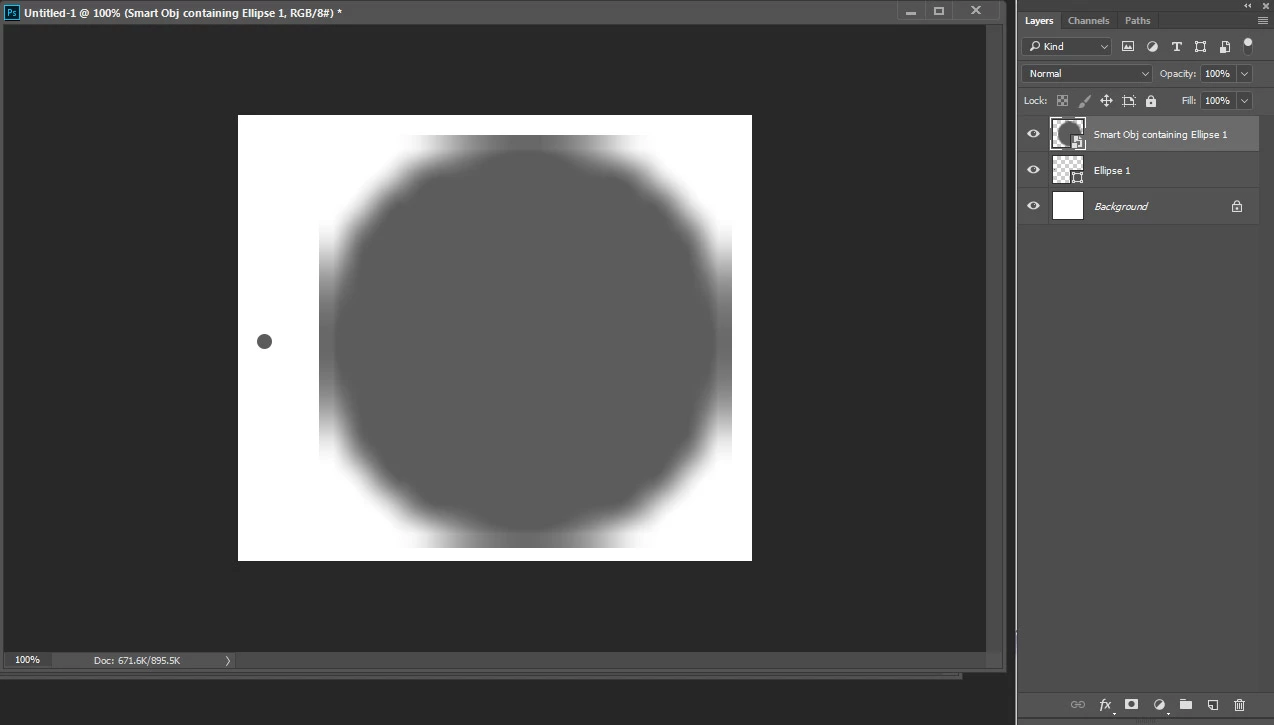
The small circle on the left is a vector shape.

I duplicated it and converted it into a smart object, then scaled it up.

Scaling a smart object should interpolate the vector data inside, correct?

I placed an embedded AI file with vector data into the same document and scaled it up, and it interpolated perfectly.

Why won't Photoshop's own vector / data interpolate? I tried the same test with a text layer, and it won't interpolate either. I KNOW I've done this a thousand times in the past.

andy

This topic has been closed for replies.
Correct answer c.pfaffenbichler

A Vector Smart Object can be a pdf-, ai- or svg-file.

When you convert something to a Smart Object in Photoshop it is a psb-file.

2 replies

c.pfaffenbichler
Community Expert
c.pfaffenbichlerCommunity ExpertCorrect answer
Community Expert
March 23, 2017

A Vector Smart Object can be a pdf-, ai- or svg-file.

When you convert something to a Smart Object in Photoshop it is a psb-file.

andy.nickAuthor
Participating Frequently
March 23, 2017

I could have SWORN I've put vector data into a PSB before and watched it interpolate vector data into smooth raster images past 100%.

I guess I was dreaming.

Maybe this is the kind of thing I can request in a future update, yea?

Thank you for the quick reply!!

c.pfaffenbichler
Community Expert
Community Expert
March 23, 2017

Quite frankly I see little chance of a change for that in the near future, but you could post a Feature Request over at:

Photoshop Family Customer Community

c.pfaffenbichler
Community Expert
Community Expert
March 23, 2017
When I convert a vector shape to a Smart Object and then scale it up, PS scales the Smart Object as if it's a raster image instead of interpolating the vector data inside. Below is a screenshot.

What you describe is a Pixel Smart Object and behaves as expected.