
Marnus Meyer
Participant
April 27, 2019
Question

Vibrance tool acting up

  • April 27, 2019
  • 2 replies
  • 820 views

HI guys, I am having some issues with the vibrance tool in Photoshop. It's responding different than usual.

Can anyone tell me why when I lower the vibrance my image gets more saturated and brighter? I've used the vibrance tool before and it's never resulted in this.

Below:

First image Vibrance = 0

Second image vibrance = -1
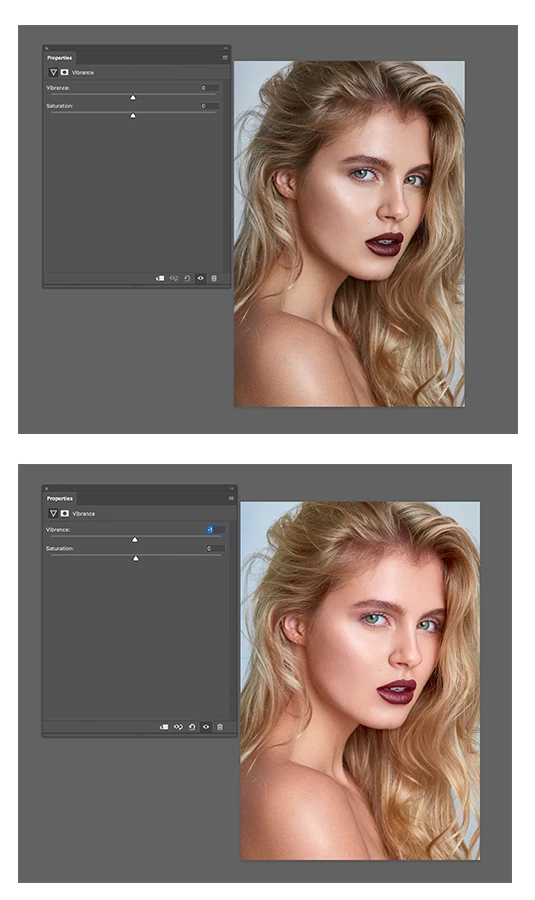
This topic has been closed for replies.

2 replies

Participant
November 25, 2019

For me I changed in Edit/Color settings- Working Spaces/RGB -
from:- Epson XPSON 640 540 Matte (Yours may be of course will be different )
to - Epson Standard RGB-Gamma 1.8 or other profiles too
and the pink was no more and I was able to use Vibrance at long last 🙂

D Fosse
Community Expert
Community Expert
November 25, 2019

No, you don't use any of those Epson profiles in Color Settings or as document profile, under any circumstances! That should always be a standard color space, sRGB, Adobe RGB or ProPhoto. Even better, don't touch anything at all in Color Settings until you understand what they do. Changing color settings without knowing what you're doing is a disaster waiting to happen.

Participant
January 7, 2020

Ok point taken,Vibrance works now though 🙂

davescm
Community Expert
Community Expert
April 27, 2019

Can you show your layers panel with the adjustment layer selected.

Also try this - go to Preferences - Performance - check 'Use Legacy Compositing' and restart then try again.

Dave

Marnus Meyer
Participant
April 27, 2019

Hi Dave,

Tried your suggestion. Did not work.

Here is my layer panel

davescm
Community Expert
Community Expert
April 27, 2019

Hi

I can't see anything wrong in your settings and I can't replicate it here.

You could try resetting preferences (Preferences >General>Reset preferences on Quit then close and restart Photoshop). If preferences get corrupted then strange behaviour can happen.

Also if you want to post a link to the file - I will try it here for you. PM me if you don't want to post it publicly.

Dave