

Answered
View artboard size in pixels
I just updated Photoshop and now I can't seem to view the artboards of all my existing projects in pixels, only in centimeters. It's not a problem to create a new project/artboard in pixels, but when I open my existing projects I now view all artboards in centimeters although they were created in pixels. My artboard options looks like this:
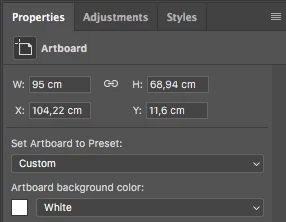
Can anyone help me with where to change the view to pixels? If I change the 'Units and Rulers' settings to pixels both the ruler and the artboard is displayed in pixels. Before I updated Photoshop it has never been an issue to display the ruler in cm and the artboards in pixels.
 AdChoices