
Visual appearance of clone stamp, dodge tool and burn tool have changed
Hi, somehow I have changed the visual appearance of my clone stamp, dodge tool and burn tool. I have visited 4 different threads here and none seem to provide me with a way to change the cursor back.
I am using CS5, Mac OS X 10.10.5. I have uploaded screen shots of the change to the cursor from “original” to “changed”. It has morphed” from a circle to a clone stamp tool that is identical in form to the tool bar image of the clone stamp. This also applies to the dodge and burn tools also
Images of the changed tool appearance are attached for reference
FWIW I have ensured that the keyboard doesn’t have the caps key locked. I have tried to find Edit > Preferences > Display & Cursors but it does not show in CS5
I’ve checked four forum posts on cursors and none appear to have covered this change and how to reverse it. So I’m posting and asking for help. I think the answer is probably an easy one. I hope.
I've uploaded an image of the original look and the new look of the tools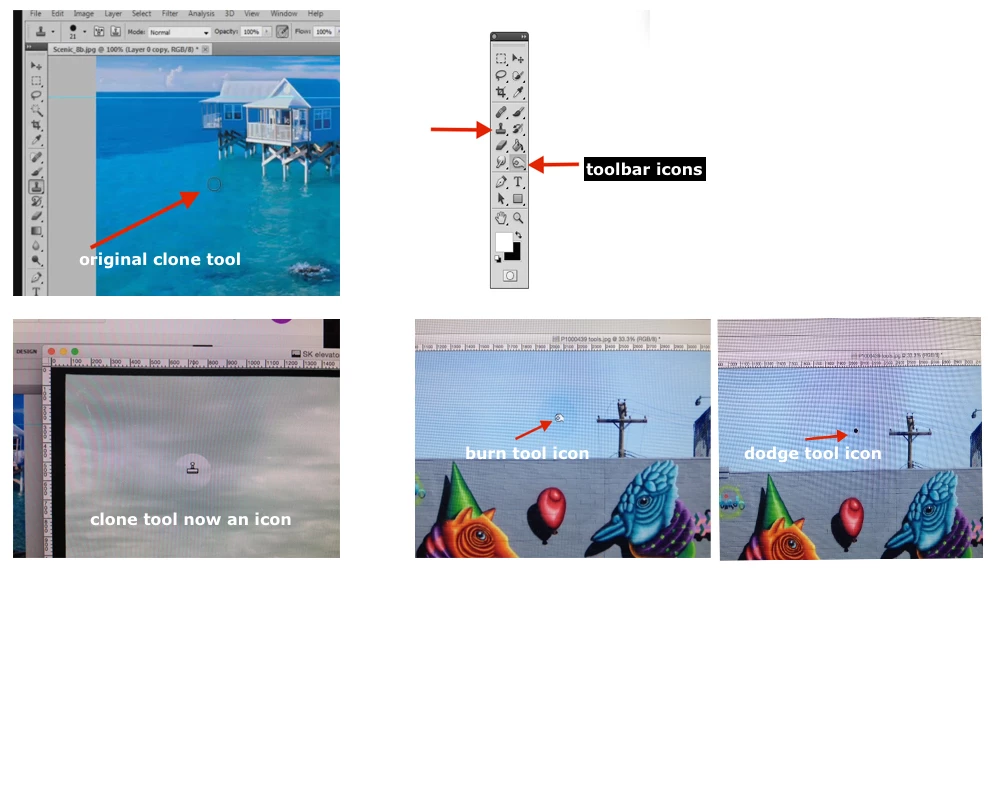
Help’s appreciated. Thanks
Jan
 AdChoices