

Vivid Light Blend Mode Broken?
Hey there Photoshop Community!
So I am not sure which update it was, but over the last several months there has been a huge change to the vivid light blend mode algorithm. It functions completely differently than it used to. I have been searching the internet to figure out why but no one seems to be talking about it.
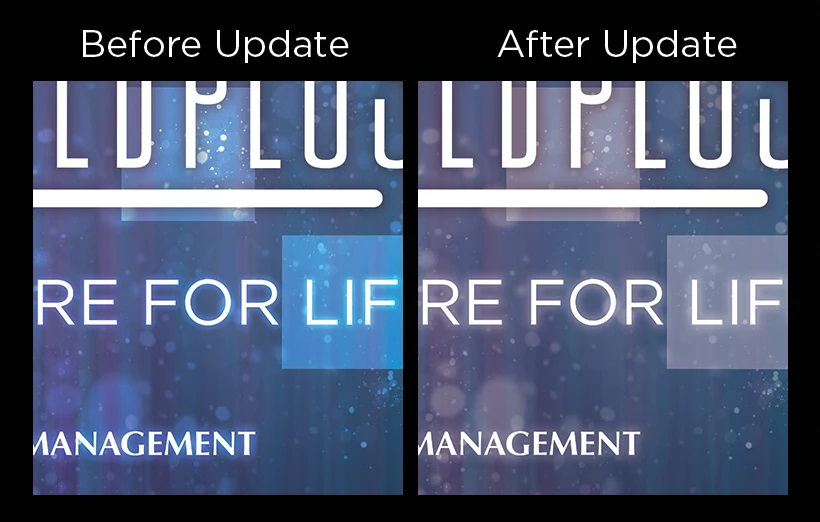
Vivid light no longer works with the color white. Instead of the wonderful boost to brightness and vibrancy, white just acts as if there is no blend mode at all. There are other ways to achieve this effect, but that requires the use of multiple effects layers and masks, whereas vivid light could achieve the same effects from a single layer
I’ve run into the issue where I now have to update several of my older files, but files where I use this effect have completely different color. I wanted to ask if there was a deliberate change to the vivid light blend mode or if this just happened to be an oversight. I’ve not found anywhere in the documentation that vivid light had been changed.
Here is an example of before and after this change. As you can see, Vivid light acts very differently from before.
Any thoughts on this matter are greatly appreciated! Thank you for your time in reading this and responding.
I am running Windows 7
Photoshop 2017.0.1
 AdChoices