
Wacom Intuos tablet creates only dots/lines instead of strokes in Photoshop CS6
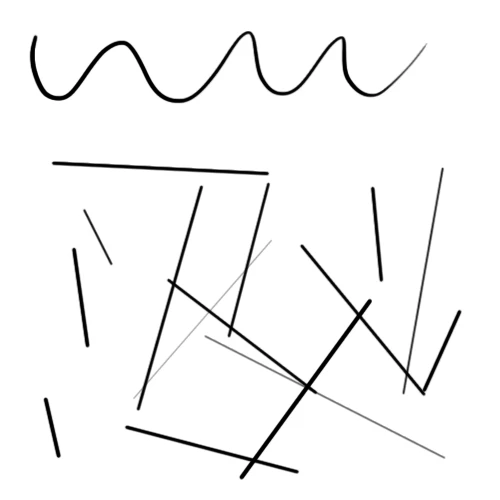
I recently bought Wacom Intuos tablet and have problems mentioned in the title. Whenever I use Photoshop CS6 (64-bit version, Win 7), press and hold the first button in my pen and drag/hover it on my tablet, at some point I'm only able to make dots and lines, slightly similiar to shift+left click function. Issue can be temporarily solved when I switch to file explorer and go back in Photoshop, but it will come back soon after I start making moves with the pen. There are few tricks I've tried which all failed to solve the problem and convinced me it's software end problem:
1. Reinstalled tablet drivers and rebooted PC.
2. Tried to recreate the problem in other software (Paint Tool SAI, Paint.net, Windows Paint).
3. Drew both with the tablet when cable plugged in USB port and with bluetooth connection.
4. Tried to unplug my regular mouse in case there's mixed signals between two pointing devices.
5. Cheked if shift (or any other) button is broken.
I want to know if there people with similar issue and if so, is there a solution? I was so ready to start using my brand new tablet and this problem is really getting to my nerves.
PS. Here's the comparison of what happened to my brush strokes after the forementioned circumstances:
 AdChoices