

user82573258
Inspiring
July 6, 2023
Question

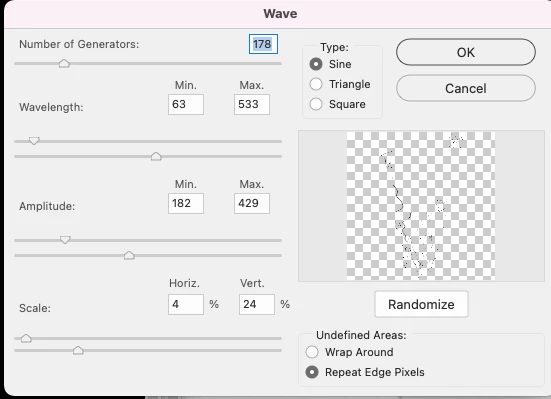
'Warp' effect preview, can't see anything

  • July 6, 2023
  • 2 replies
  • 304 views

I have an outline shape that Im trying to distort but can hardly see anything in the preview in the dialog box.

Originally it was white so I changed it to black, but is still practically invisible.

If I could just make the dialog box bigger, or zoom in, then it would be fine.

How does anyone manage to work with this effect? It just ends up being pure guesswork with me as I can't see what I'm doing
 

This topic has been closed for replies.

2 replies

Legend
July 6, 2023

1. Change the color of the transparency squares to white or solid color, or disable it altogether in the transparency settings.

2. Before applying the filter, temporarily change the screen resolution, for example to 600x800.

Sef McCullough
Community Expert
Community Expert
July 6, 2023

Hi @user82573258 ,

I feel your pain. I was doing some experiments with Wave filter just the other day.

Unfortunately, many of the filters, especially under Distort, are ancient. And tend to be pretty low priority for updating.

Not sure if it's a good option, but have you tried using Puppet Warp to apply the wave distortion to that layer manually?

Convert it to a smart object first so it remains editable.

Let us know how it goes!

Sef