
February 15, 2021
Question

warping text doesn't stay smooth

  • February 15, 2021
  • 2 replies
  • 274 views

hi, i'm semi-new to using photoshop. this may be a dumb inquiry, but i can't seem to figure it out.

i've been trying to figure out how to warp rasterized text (or, really anything) and keep it looking smooth.

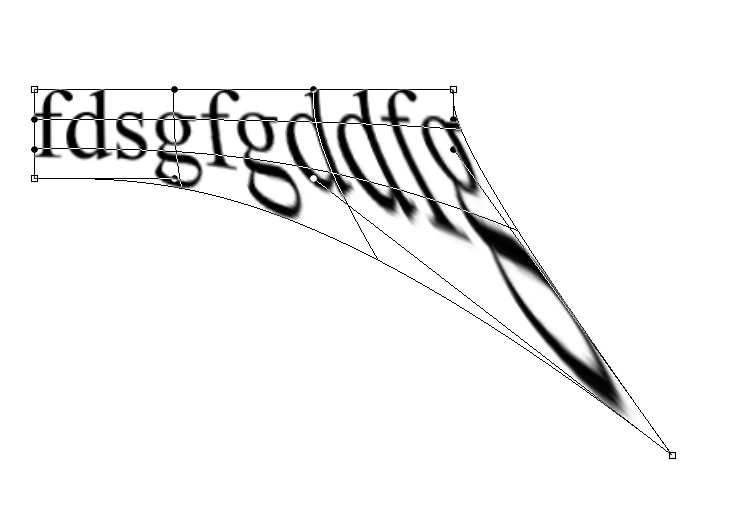
here's what it looks like before clicking OK:
and here's after:
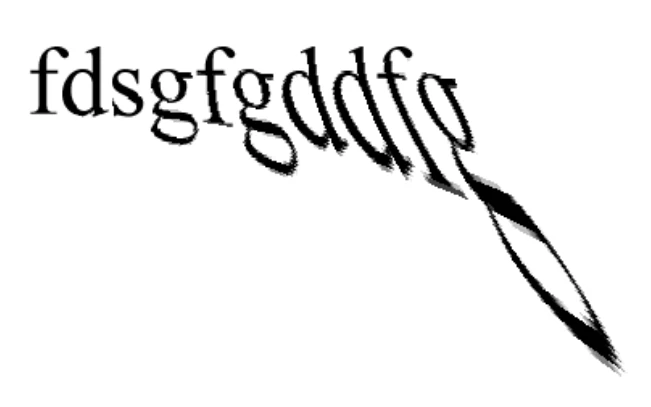
 

it looks a lot more jagged and less clean. is there any way to prevent this, and keep it looking the way it does before clicking OK? thanks.

This topic has been closed for replies.

2 replies

Jeff Arola
Community Expert
Community Expert
February 15, 2021

You definitely don't want Bilinear or Nearest Neighbor, but one of the Bicubic settings.


Resampling

https://helpx.adobe.com/photoshop/using/image-size-resolution.html


I would go with the default of Bicubic Automatic, restart photoshop and see if that makes any difference.

Jeff Arola
Community Expert
Community Expert
February 15, 2021

What is the Image Interpolation setting under Edit>Preferences>General?


February 15, 2021

it is currently set to Bilinear, though i have tried each other option.