Known Participant
September 17, 2021
Answered

Water Reflection action stops on Ripple command

  • September 17, 2021
  • 1 reply
  • 609 views

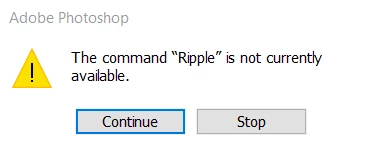
I'm still pretty new to Photoshop CC so I'm not sure if I'm missing something. Trying to use the Water Reflection action (already installed when I downloaded) and it gets stuck on the Ripple step. I can't find it in any of the filter settings. Using 22.5.0

This topic has been closed for replies.
Correct answer Stephen Marsh

Ripple is a distort filter.


Water Reflection (type) – The action is intended to cast a drop shadow under text.


The action is written around a type layer. That being said, it can be run on a standard raster layer, as long as the layer content is small enough compared to the canvas size in order for the "cast shadow" to fit within the canvas. You will need sufficient space under the layer content and at the sides to accommodate the new content.


1 reply

Stephen Marsh
Community Expert
Stephen MarshCommunity ExpertCorrect answer
Community Expert
September 17, 2021

Ripple is a distort filter.


Water Reflection (type) – The action is intended to cast a drop shadow under text.


The action is written around a type layer. That being said, it can be run on a standard raster layer, as long as the layer content is small enough compared to the canvas size in order for the "cast shadow" to fit within the canvas. You will need sufficient space under the layer content and at the sides to accommodate the new content.


Known Participant
September 17, 2021

Thank you! I didn't realize how it worked. Makes sense now. Appreciate the response 🙂