@dparsons85
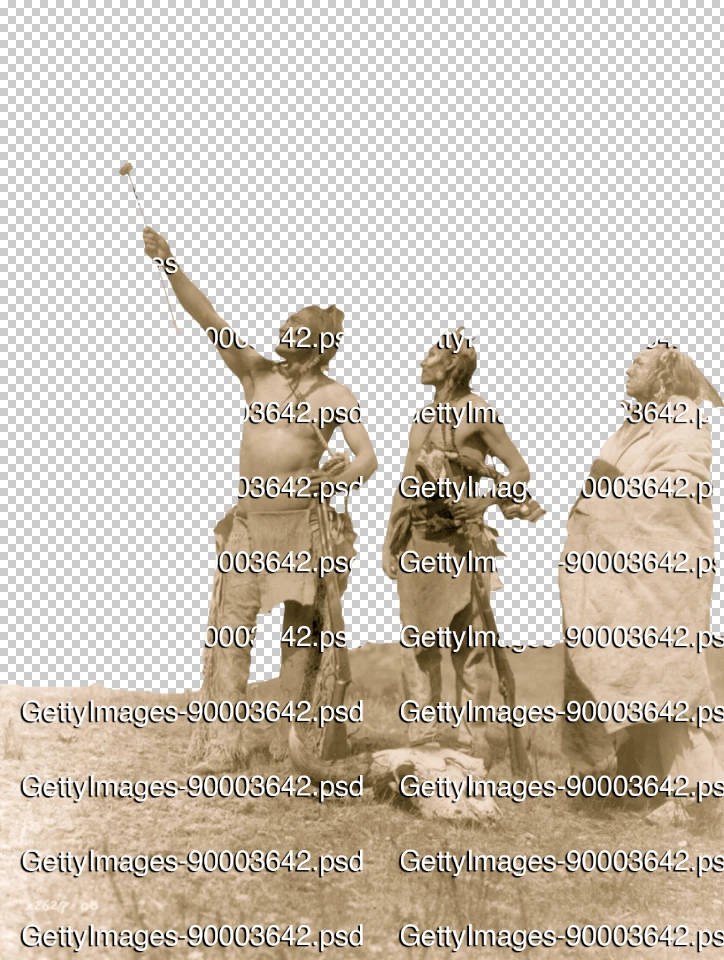
Try the following script. It can be recorded into an action. The action can then be batched. You may need to tweak variables such as the font name, font size, watermark padding, drop shadow etc. The code has been commented to help you with this, however, please let me know if you need any help in making the alterations.
Special thanks to @c.pfaffenbichler and @Tom Winkelmann for helping with a couple of key functions.
/*
Add Repeated Filename Watermark.jsx
https://community.adobe.com/t5/photoshop-ecosystem-discussions/watermark-image-with-filename/td-p/13266182
v1.0 - 14th October 2022, Stephen Marsh
With thanks to c.pfaffenbichler & by Tom Winkelmann
*/

#target photoshop

if (documents.length > 0) {

    // Settings configuration
    var originalDialogMode = app.displayDialogs;
    app.displayDialogs = DialogModes.NO;
    var originalRulerUnits = app.preferences.rulerUnits;
    app.preferences.rulerUnits = Units.PIXELS;
    var originalRes = app.activeDocument.resolution;
    activeDocument.resolution = 72;

    try {

        // Select top/front layer without changing visibility
        if (activeDocument.layers[0].visible === false) {
            activeDocument.activeLayer = activeDocument.layers[0];
            activeDocument.activeLayer.visible = false;
        } else {
            activeDocument.activeLayer = activeDocument.layers[0];
        }

        // Add the text layer
        var LayerRef = activeDocument.artLayers.add();
        LayerRef.kind = LayerKind.TEXT;
        var textRef = LayerRef.textItem;
        textRef.contents = activeDocument.name;
        textRef.position = new Array(100, 100);
        app.preferences.rulerUnits = Units.POINTS;
        textRef.size = 50; // Font size
        textRef.font = 'ArialMT'; // PostScript font name
        textRef.justification = Justification.LEFT;
        var textColor = new SolidColor;
        textColor.rgb.red = 255;
        textColor.rgb.green = 255;
        textColor.rgb.blue = 255;
        textRef.color = textColor;
        app.preferences.rulerUnits = Units.PIXELS;

        // Convert the selected layer to an embedded smart object
        executeAction(stringIDToTypeID("newPlacedLayer"), undefined, DialogModes.NO);

        // Edit the smart object
        app.runMenuItem(stringIDToTypeID('placedLayerEditContents'));

        // Pad the canvas
        relativeCanvasSize(true, 10, 100);

        // Add a drop shadow
        setDropShadow(100, true, true, true, 0, 0, 0, 75, true, 90, 5, 10, 15, 0, false, "Linear", true, 135);

        // Define the pattern
        createPattern();

        // Close the smart object
        activeDocument.close(SaveOptions.DONOTSAVECHANGES);

        // Remove the smart object layer
        activeDocument.activeLayer.remove();

        // Add the watermark layer
        createPatternLayer("filenameWatermark");
        activeDocument.activeLayer.name = "Watermark";

        // Adjust the pattern
        //adjustPattern(100, 0, "filenameWatermark");

        // Clear the pattern ready for the next batch item
        removePatternByName();

        // Clip the watermark layer
        app.runMenuItem(stringIDToTypeID('groupEvent'));

        // Reset the original settings on successful execution
        app.preferences.rulerUnits = originalRulerUnits;
        app.displayDialogs = originalDialogMode;
        activeDocument.resolution = originalRes;

    } catch (e) {
        // Reset the original settings on error
        app.preferences.rulerUnits = originalRulerUnits;
        app.displayDialogs = originalDialogMode;
        activeDocument.resolution = originalRes;
    }
}


// Functions

function relativeCanvasSize(relative, width, height) {
    var s2t = function (s) {
        return app.stringIDToTypeID(s);
    };
    var descriptor = new ActionDescriptor();
    descriptor.putBoolean(s2t("relative"), relative);
    descriptor.putUnitDouble(s2t("width"), s2t("percentUnit"), width);
    descriptor.putUnitDouble(s2t("height"), s2t("percentUnit"), height);
    descriptor.putEnumerated(s2t("horizontal"), s2t("horizontalLocation"), s2t("center"));
    descriptor.putEnumerated(s2t("vertical"), s2t("verticalLocation"), s2t("center"));
    executeAction(s2t("canvasSize"), descriptor, DialogModes.NO);
}

function createPattern() {
    var idmake = stringIDToTypeID("make");
    var desc2775 = new ActionDescriptor();
    var idnull = stringIDToTypeID("null");
    var ref107 = new ActionReference();
    var idpattern = stringIDToTypeID("pattern");
    ref107.putClass(idpattern);
    desc2775.putReference(idnull, ref107);
    var idusing = stringIDToTypeID("using");
    var ref108 = new ActionReference();
    var idproperty = stringIDToTypeID("property");
    var idselection = stringIDToTypeID("selection");
    ref108.putProperty(idproperty, idselection);
    var iddocument = stringIDToTypeID("document");
    var idordinal = stringIDToTypeID("ordinal");
    var idtargetEnum = stringIDToTypeID("targetEnum");
    ref108.putEnumerated(iddocument, idordinal, idtargetEnum);
    desc2775.putReference(idusing, ref108);
    var idname = stringIDToTypeID("name");
    desc2775.putString(idname, """filenameWatermark""");
    executeAction(idmake, desc2775, DialogModes.NO);
}

function createPatternLayer(theName) {
    // by c.pfaffenbichler
    var idmake = stringIDToTypeID("make");
    var desc5 = new ActionDescriptor();
    var idnull = stringIDToTypeID("null");
    var ref1 = new ActionReference();
    var idcontentLayer = stringIDToTypeID("contentLayer");
    ref1.putClass(idcontentLayer);
    desc5.putReference(idnull, ref1);
    var idusing = stringIDToTypeID("using");
    var desc6 = new ActionDescriptor();
    var idtype = stringIDToTypeID("type");
    var desc7 = new ActionDescriptor();
    var idpattern = stringIDToTypeID("pattern");
    var desc8 = new ActionDescriptor();
    var idname = stringIDToTypeID("name");
    desc8.putString(idname, theName); // Pattern name
    var idpattern = stringIDToTypeID("pattern");
    desc7.putObject(idpattern, idpattern, desc8);
    var idpatternLayer = stringIDToTypeID("patternLayer");
    desc6.putObject(idtype, idpatternLayer, desc7);
    var idcontentLayer = stringIDToTypeID("contentLayer");
    desc5.putObject(idusing, idcontentLayer, desc6);
    executeAction(idmake, desc5, DialogModes.NO);
}

function removePatternByName() {
    // by Tom Winkelmann
    var d = new ActionDescriptor();
    var r = new ActionReference();
    r.putName(stringIDToTypeID("pattern"), "filenameWatermark");
    d.putReference(stringIDToTypeID("null"), r);
    executeAction(stringIDToTypeID("delete"), d, DialogModes.NO);
}

function setDropShadow(scale, enabled, present, showInDialog, red, grain, blue, opacity, useGlobalAngle,
localLightingAngle, distance, chokeMatte, blur, noise, antiAlias, name2, layerConceals, globalLightingAngle) {
    var s2t = function (s) {
        return app.stringIDToTypeID(s);
    };
    var descriptor = new ActionDescriptor();
    var descriptor2 = new ActionDescriptor();
    var descriptor3 = new ActionDescriptor();
    var descriptor4 = new ActionDescriptor();
    var descriptor5 = new ActionDescriptor();
    var reference = new ActionReference();
    reference.putProperty( s2t( "property" ), s2t( "layerEffects" ));
    reference.putEnumerated( s2t( "layer" ), s2t( "ordinal" ), s2t( "targetEnum" ));
    descriptor.putReference( s2t( "null" ), reference );
    descriptor2.putUnitDouble( s2t( "scale" ), s2t( "percentUnit" ), scale );
    descriptor3.putBoolean( s2t( "enabled" ), enabled );
    descriptor3.putBoolean( s2t( "present" ), present );
    descriptor3.putBoolean( s2t( "showInDialog" ), showInDialog );
    descriptor3.putEnumerated( s2t( "mode" ), s2t( "blendMode" ), s2t( "multiply" ));
    descriptor4.putDouble( s2t( "red" ), red );
    descriptor4.putDouble( s2t( "grain" ), grain );
    descriptor4.putDouble( s2t( "blue" ), blue );
    descriptor3.putObject( s2t( "color" ), s2t( "RGBColor" ), descriptor4 );
    descriptor3.putUnitDouble( s2t( "opacity" ), s2t( "percentUnit" ), opacity );
    descriptor3.putBoolean( s2t( "useGlobalAngle" ), useGlobalAngle );
    descriptor3.putUnitDouble( s2t( "localLightingAngle" ), s2t( "angleUnit" ), localLightingAngle );
    descriptor3.putUnitDouble( s2t( "distance" ), s2t( "pixelsUnit" ), distance );
    descriptor3.putUnitDouble( s2t( "chokeMatte" ), s2t( "pixelsUnit" ), chokeMatte );
    descriptor3.putUnitDouble( s2t( "blur" ), s2t( "pixelsUnit" ), blur );
    descriptor3.putUnitDouble( s2t( "noise" ), s2t( "percentUnit" ), noise );
    descriptor3.putBoolean( s2t( "antiAlias" ), antiAlias );
    descriptor5.putString( s2t( "name" ), name2 );
    descriptor3.putObject( s2t( "transferSpec" ), s2t( "shapeCurveType" ), descriptor5 );
    descriptor3.putBoolean( s2t( "layerConceals" ), layerConceals );
    descriptor2.putObject( s2t( "dropShadow" ), s2t( "dropShadow" ), descriptor3 );
    descriptor2.putUnitDouble( s2t( "globalLightingAngle" ), s2t( "angleUnit" ), globalLightingAngle );
    descriptor.putObject( s2t( "to" ), s2t( "layerEffects" ), descriptor2 );
    executeAction( s2t( "set" ), descriptor, DialogModes.NO );
}

function adjustPattern(scale, angle, patternName) {
	var s2t = function (s) {
		return app.stringIDToTypeID(s);
	};
	var descriptor = new ActionDescriptor();
	var descriptor2 = new ActionDescriptor();
	var descriptor3 = new ActionDescriptor();
	var reference = new ActionReference();
	reference.putEnumerated( s2t( "contentLayer" ), s2t( "ordinal" ), s2t( "targetEnum" ));
	descriptor.putReference( s2t( "null" ), reference );
	descriptor2.putUnitDouble( s2t( "scale" ), s2t( "percentUnit" ), scale );
	descriptor2.putUnitDouble( s2t( "angle" ), s2t( "angleUnit" ), angle );
	descriptor3.putString( s2t( "name" ), patternName );
	descriptor2.putObject( s2t( "pattern" ), s2t( "pattern" ), descriptor3 );
	descriptor.putObject( s2t( "to" ), s2t( "patternLayer" ), descriptor2 );
	executeAction( s2t( "set" ), descriptor, DialogModes.NO );
}
- Copy the code text to the clipboard
- Open a new blank file in a plain-text editor (not in a word processor)
- Paste the code in
- Save the text file as .txt
- Rename the file extension from .txt to .jsx
- Install or browse to the .jsx file to run (see below)
https://prepression.blogspot.com/2017/11/downloading-and-installing-adobe-scripts.html#Photoshop





 AdChoices