Known Participant
February 10, 2022
Answered

Watermark Won't Appear after Action Run

  • February 10, 2022
  • 2 replies
  • 945 views

I have tried various techiniques for creating a watermark using an action - creating a brush - copying a logo and the only technique that works is using a text layer. The other techniques work when I create the action recording the steps, however when the action runs depending on the method I receive messages that the commands move, transform are not available or the final image does not show the watermark. I am using Photoshop 23.1.1 with Win 10. Any help is appreciated
This topic has been closed for replies.
Correct answer c.pfaffenbichler

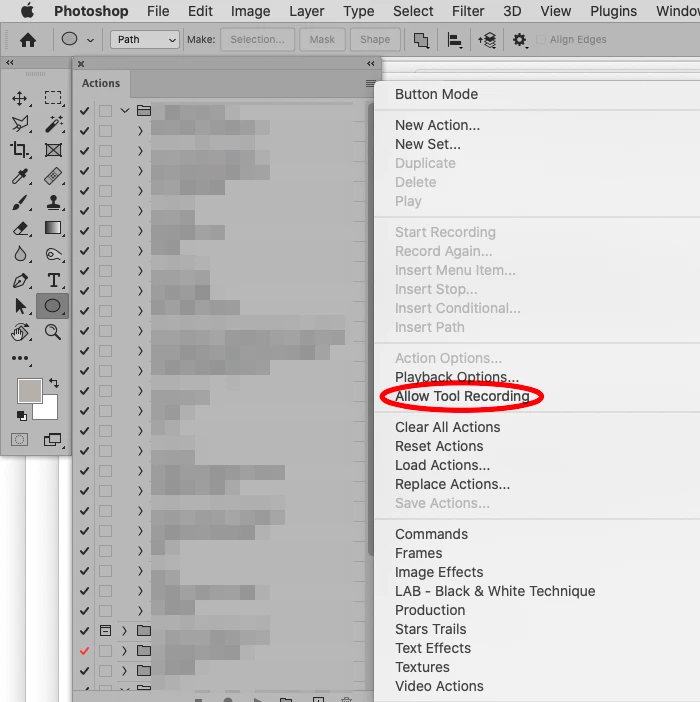
I see no Brush application in the Action; is »Allow Tool Recording« enabled? 


Can you show the Logo? 

If you have a vector version of the logo I recommend using »Insert Path« instead of a Brush. 

And even if not I would recommend placing a Smart Object. 


Edit: 

2 replies

bainbruAuthor
Known Participant
February 11, 2022

Sorry for duplicate message the screen print did not appear on first one.

Thks for responding. Attached is a screen print of an action, Watermark Brush. The action flattens an image and a layer is added. A brush with my logo is added to the new layer and the opacity is lowered. The image is flattened, resized, saved and the action stopped. The action does not show the brush steps.

When I created the action, the result was perfect showing the watermark (logo). However, when I ran the action from batch, the watermark did not appear. The resulting images were sized correctly per the action.

Any help explaining what I am doing wrong is appreciated.

c.pfaffenbichler
Community Expert
c.pfaffenbichlerCommunity ExpertCorrect answer
Community Expert
February 13, 2022

I see no Brush application in the Action; is »Allow Tool Recording« enabled? 


Can you show the Logo? 

If you have a vector version of the logo I recommend using »Insert Path« instead of a Brush. 

And even if not I would recommend placing a Smart Object. 


Edit: 

bainbruAuthor
Known Participant
February 14, 2022
Thks - enabling use of tools was the solution. I am not sure why this option is needed. I thought recording would capture any and all options and keystrokes. Again thanks for the help.
c.pfaffenbichler
Community Expert
Community Expert
February 11, 2022

Please provide more detailed descriptions and the accompanying screenshots (including all pertinent Panels). 

How and where did you copy a logo for example? 


Have you tried »Insert Path« from the Actions Panel’s fly-out menu? 

Have you tried File > Place Embedded in an Action? (Edit: This would naturally require the logo to be at the same location the next time the Action is run.) 

bainbruAuthor
Known Participant
February 11, 2022
Thks for responding. Attached is a screen print of an action, Watermark Brush. The action flattens an image and a layer is added. A brush with my logo is added to the new layer and the opacity is lowered. The image is flattened, resized, saved and the action stopped. The action does not show the brush steps.

When I created the action, the result was perfect showing the watermark (logo). However, when I ran the action from batch, the watermark did not appear. The resulting images were sized correctly per the action.

Any help explaining what I am doing wrong is appreciated.