
Known Participant
November 2, 2016
Question

We have CC 2017... but still not custom UI scaling

  • November 2, 2016
  • 6 replies
  • 11201 views

Today I've discovered the big news about CC2 2017 has gone out. Fantastic, I was so happy.
My happiness stopped when I've discovered Photoshop CC 2017 still hasn't a custom/intermediate scaling option for user interface.
Just 100% and 200%. And of course both aren't the best options to work with.
For example, my Spectre x360 is a 13,3 laptop with QHD display (2560x1440).

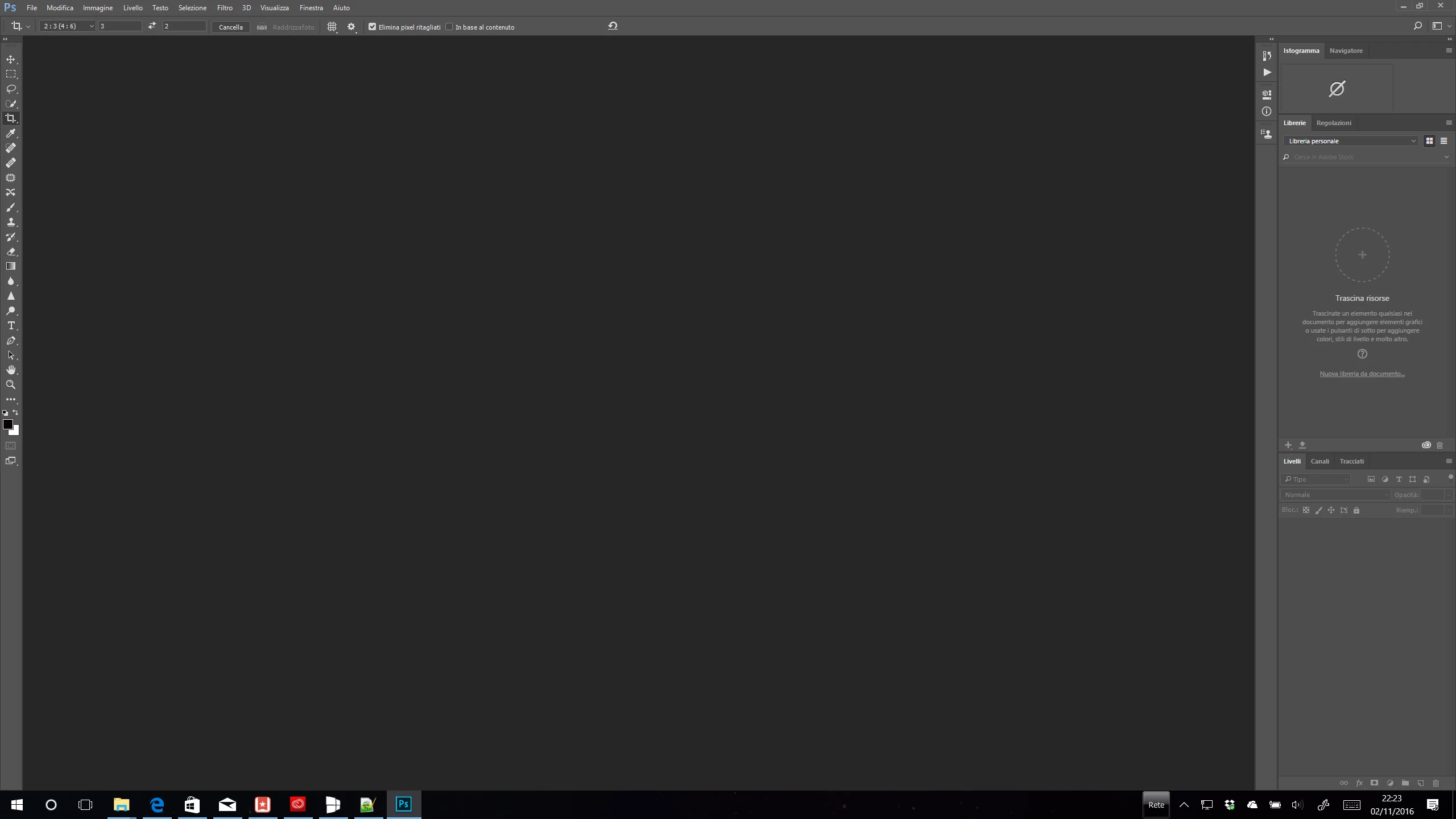
Setting PS to 100% gives me microscopic interface, and while I like tinty interface which shows a lot of information on the display, this is way too small and not the best condition in a working envinroment.

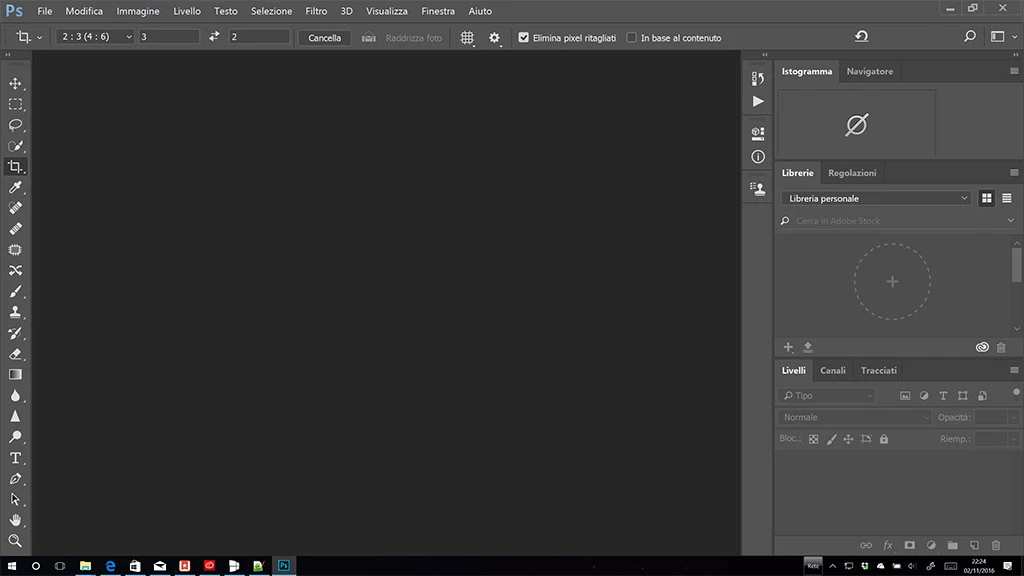
Selecting the 200% scaling leads to a enormous interface, wasting a lot of space and looking so clunky.

Sorry for the question, but does really Adobe can't provide a such basic and easy function to its software? We are at 2017 iteration of the software and we can't manage the UI scaling correctly.

I'm pretty disappointed.

100% scaling
200% scaling
This topic has been closed for replies.

6 replies

AleeKZandR
Participant
May 30, 2017

I can relate to this. Got a new notebook, 15" 1080p display, and Windows is set to 150% scaling because 100% makes everything too small.

Illustrator do 150% scaling, and is the same thing with Indesign, After Effects and even Premier and Audition. With all this applications, the scaling can be set to a constant between them. Photoshop is the only exception and I cannot even acknowledge why. After Effects and Premier are both not intended for printing, still the UI scaling shows no problem with Windows 10 settings. Even the splash screen for Photoshop is shown in 2x!

In the following example, I set a 512x512px artboard with a 100x100px black square for comparisons.

The UI handling isn't made the same way for all the Adobe apps? In all of them we can change UI color etc. Except for Photoshop. Why?

Known Participant
March 12, 2018

Nope, my resolution is 3200 x 1600 yoga 900 and the interface is tiny, when set on 200%

This is because windows display settings recommends 250% and all my other apps work fine. Apart from Adobe, AI, PS and ID

I dont care about real estate as I like my files to be high res, but its the menu items are for ants! But when I hover over the menu items the dropdown items are the right size

This is ridiculous from Adobe

JJMack
Community Expert
Community Expert
March 12, 2018

If you are a Windows user. Adobe fixed its UI scaling in CC 2018 version 19.1 using new windows 10 feature. So if you have windows 10 and CC 2018 19.1.1 you can set your windows scaling to as high as 400%. However with a display the only displays 1600 high scaled 400% your UI height would be 400px and Photoshop UI would not fix on you display. Photoshop requires 1024x768 for its UI. Scaled 200% your UI display becomes  1600x800 Photoshop UI fits. Scaled 225% you UI display becomes 1422x711 Photoshop UI does not fit.  Your Display need to meet Photoshop requirements.  Scaled 400% your 3200x1600 display becomes a 800x400display your High resolution display dose not have the number of pixel to be able to scaled more than 200% and meet Photoshop's requirement of 1024x768.... It is your Display that is the Problem.

JJMack
norbyscook_andy_
Participating Frequently
January 19, 2017

I do agree, IT HAS BEEN YEARS, and Adobe is still not making this happen. Users should not be doing coding work to get a good interface!

^ can't even see the rest of the tool bar

using a cintiq 13 HD on a desktop

it is not good at all

- Adobe PLEASE fix this !!!

Participant
November 8, 2016

Where DID they hide the UI Scaling option now.....I want to use the 100% option because 200% is unusable but cant find the option to turn it OFF now.....God this is sooo frustrating!!

-Chris

mytaxsite
Inspiring
November 8, 2016

See this picture where I have marked the relevant sections:

Go to:  Edit >> Preferences then look for something like this:

Change it to Auto and you should be back to normal.

:

Participant
November 26, 2016

Thank you totally worked as advertised!!

mytaxsite
Inspiring
November 3, 2016

Try this old technique:

<Adobe App Scaling on High DPI Displays (FIX) | Dan Antonielli >

He has got a video on youTube as well so watch this for quick review:

.

norbyscook_andy_
Participating Frequently
January 20, 2017

wow! thank you! this works! I don't know much, but should not Adobe be able to fix the problem if this guy did it?

JJMack
Community Expert
Community Expert
January 20, 2017

Adobe want you to be able to see your image pixel on your display using you displays high dip resolution.  Using Windows scaling you can not do that.  The image you seen on you display is scaled to a lower resolution by windows.  Adobe only displays your images actual pixels when you zoom to 100% and then Windows scale what Adobe displays to a lower resolution.

JJMack
buffmasterbran
Participant
November 3, 2016

If it makes you feel any better, I had an appropriate scaled UI... Till today!  They messed something up and now it is either HUGE!!! or small...

JJMack
Community Expert
Community Expert
November 3, 2016

Set your Photoshop preference UI scaling to 100% Adobe may have set it to Auto and is now scaling your  Photoshop UI 2X when it should not. Adobe UI scaling has problems

JJMack
JJMack
Community Expert
Community Expert
November 2, 2016

That is what Adobe 2X UI does.  Adobe stated they are working with Microsoft on Display scaling solutions.  Nothing has been disclosed about about any plans to do anything. Big companies do not disclose things like schedules or details about what is in the works or if anything is in the works..

JJMack