Participant
November 16, 2018
Answered

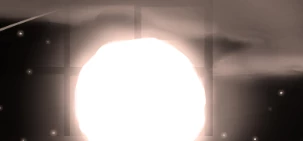
Weird problems with lighting making a grid effect

  • November 16, 2018
  • 2 replies
  • 536 views

So, I updated to the new photoshop and when I try to save images that have a glow to them, there's a weird effect where there's a grid cutting through it?? Has anyone

else had this issue or know how to fix it? I can't figure out what's causing it.

This topic has been closed for replies.
Correct answer davescm

Can you go to Preferences > Performance and check "Use Legacy Compositing" and see if it makes a difference

Dave

2 replies

Mohammad.Harb
Community Expert
Community Expert
November 16, 2018

are you using the outer glow from layer style ? if yes, try to reset the glow to default, save the file

if that does't work out,  create a new document, add an object  with outer glow and  save the file, are you getting the same result?

Participant
November 16, 2018

I'm not using outer glow. Not for all of them at least, the only one that has any outer glow is the one with the moon. The others are just brushes with softness turned up and opacity and flow set to pen pressure, and some opacity set to the layer.

davescm
Community Expert
davescmCommunity ExpertCorrect answer
Community Expert
November 16, 2018

Can you go to Preferences > Performance and check "Use Legacy Compositing" and see if it makes a difference

Dave

Mohammad.Harb
Community Expert
Community Expert
November 16, 2018

Which operating  system?

is the file bit depth set to 8,16 or 32 bit?

is there any blending modes or opacity set to layers?

Have you tried saving in png, tiff, png And get the same result?

Participant
November 16, 2018

I'm not sure how to answer that first part because I don't know what it is? But the file is 8 bit, and does have blending and opacity on some layers for each of the images. And it seems like the other formats have the same issue (I only checked with one of the images)

It's also only when I save as or flatten the image that it happens too. It looks fine as the psd until then.