
Known Participant
June 14, 2018
Answered

What color profile to use for screencaptures in Photoshop?

  • June 14, 2018
  • 6 replies
  • 1338 views

I have a situation that is driving me bonkers. When I take a screenshot/capture, used to be (I think) I'd paste it into Photoshop with the default settings (US General Purpose 2). Save As with sRGB, and done.

Now, it seems like when I paste it, even if I set the thing to 'Don't manage color profile' OR sRGB, the pasted thing looks all washed out? It only retains the color if I choose AdobeRGB for the profile? But afterwards, it doesn't matter if I save it as AdobeRGB or sRGB, it looks the same.

I am not sure if this has something to do with my color profiler - I used to use a Pantone Huey pro and switched to a Color Munki Design some months ago.

I did a test image to show the differences. You can see the image yourself online here: https://www.pexels.com/photo/yellow-blue-red-pink-purple-green-multicolored-open-umbrellas-hanging-on-strings-under-blue-sky-163822/

I am confused as to whether something changed (be it my profiler, or something with how PS 18 works), or whether it's always been this way?
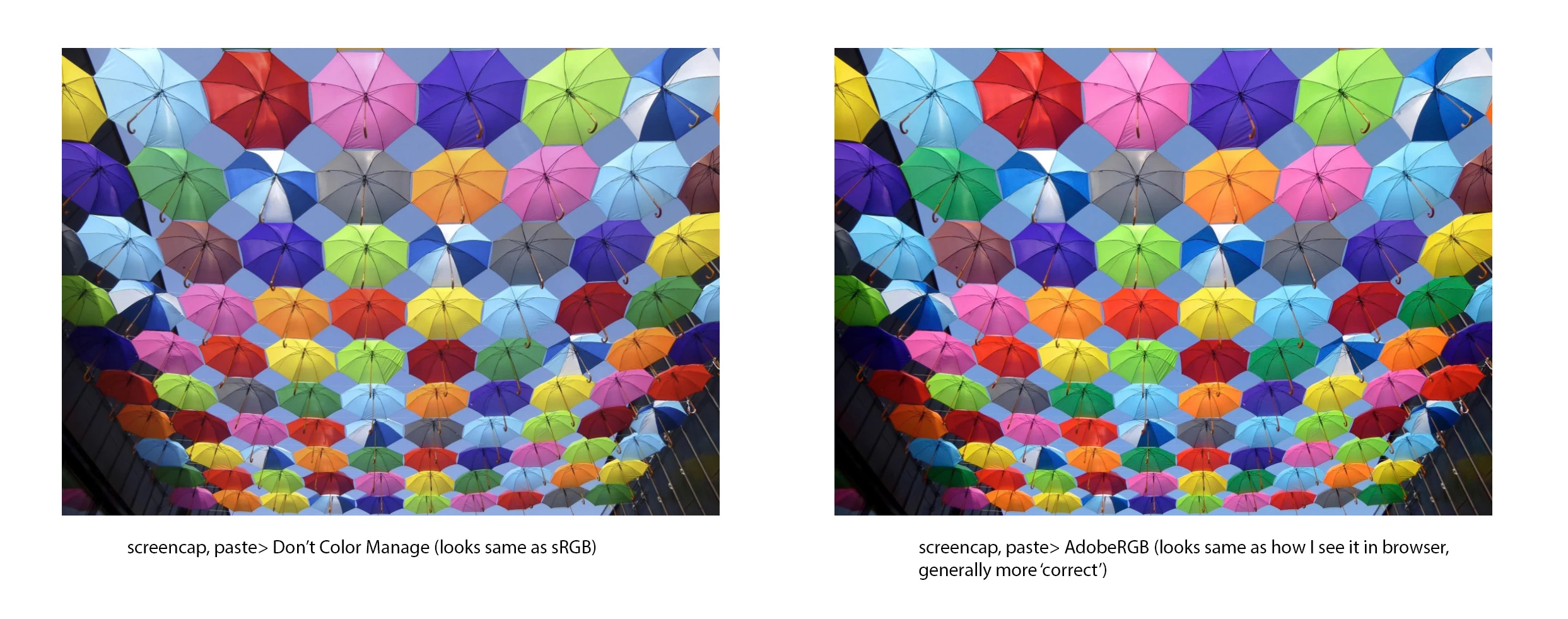
This topic has been closed for replies.
Correct answer D Fosse

Assign your monitor profile!

Then convert to a standard color space.

6 replies

charleneAuthor
Known Participant
June 15, 2018

OK... so... I had everything synced to General Purpose, which for RGB uses sRGB.

I just changed to to North American Prepress and that defaults to using Adobe RGB.

I think that solves my problem, even if it doesn't explain why things went weird. Perhaps I had my previous settings to North American Prepress and when it updated it reverted to General and I didn't notice...

davescm
Community Expert
Community Expert
June 15, 2018

Charlene

D.Fosse has given you the right way to do this in post 7. Anything else will not give the correct colour.

Your choice of colour space is not the cause.

After following D.Fosses steps, when sharing a screenshot to the web convert to and embed the sRgb profile.

Dave

Martin_Bns
Inspiring
June 15, 2018

Hi there, screencapture is used to share your screen with someone on screen as final device. You have to suppose that the 90% of people you deal with not have an Adobe Rgb monitor.

It's safe to share your screen in sRgb.

Cheers,
Martin

D Fosse
Community Expert
D FosseCommunity ExpertCorrect answer
Community Expert
June 15, 2018

Assign your monitor profile!

Then convert to a standard color space.

melissapiccone
Community Expert
Community Expert
June 15, 2018

Have you tried opening the image in PS instead of doing a copy paste?

Melissa Piccone | Adobe Trainer | Online Courses Author | Fine Artist
charleneAuthor
Known Participant
June 15, 2018

In this specific instance, the client wants to see something in another program. It is certainly possible to do it another way, but at the moment they like the screencap.

I guess it's ok if I just remember to make every screencap Adobe RGB when I paste it in PS... I just don't recall having to do that last time and it somehow preserved the colors. Not sure what changed; I do think I would have noticed it before if I pasted a screencap and the colors were different.

I did not change my monitors, and I do not recall the problem when I changed my graphics card. So I think something changed either when I changed my color profiler, or when I updated Photoshop to CC18.    

melissapiccone
Community Expert
Community Expert
June 14, 2018

What is the end result of the image? Is it going to the web or are you publishing it? I don't know why it changed. I use Snagit for screencaptures but I'm not at all concerned with the color, so I have no idea how it handles it.

Melissa Piccone | Adobe Trainer | Online Courses Author | Fine Artist
charleneAuthor
Known Participant
June 15, 2018

A client wishes to see some images on their screen, and they prefer to see them in such a way that it's easier for me to take a screencapture and send it along.

There was some concern as to why the colors looked different, and I realized for one I had done copy-paste into Photoshop as default, resulting in a duller color. For another, I had remembered to changed it to Adobe RGB, and the color was brighter in that version.

melissapiccone
Community Expert
Community Expert
June 14, 2018

Adobe RGB is a much larger space. Looks like it's defaulting to sRGB. Are you just using your computer to do the screen capture?

Melissa Piccone | Adobe Trainer | Online Courses Author | Fine Artist
charleneAuthor
Known Participant
June 14, 2018

Yes, I'm just hitting Prt Scr on my keyboard to do the screen capture.

I've done it that way for years, I just don't recall having to change the profile to Adobe RGB before. Confused and wondering if I need to do this from now on.