yamchahensem
Participant
September 28, 2018
Answered

What fonts?
  • September 28, 2018
  • 4 replies
  • 760 views

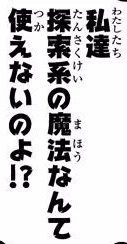
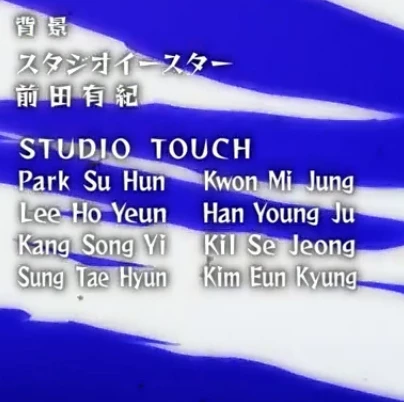
Hi, everyone. Can I know what fonts did they used in both images?

*Sorry for my bad english

    This topic has been closed for replies.
    Correct answer Subi Omu

    fontworks コミックレゲエ

    https://fontworks.co.jp/fontsearch/item?ComicReggaeStd-B&word=STUDIO%20TOUCH%0A


    タイプバンク ぶらっしゅ

    https://www.typebank.co.jp/fontfamily/brush/

    4 replies

    S_Gans
    Community Expert
    Community Expert
    October 3, 2018

    @user2939418, I assumed that since the primary text on the document was in English, that's what the OP was trying to resolve. Thank you...

    Adobe Community Expert / Adobe Certified Instructor
    Subi Omu
    Subi OmuCorrect answer
    Participating Frequently
    October 3, 2018
    S_Gans
    Community Expert
    Community Expert
    September 28, 2018

    Also, Typekit has a function where you can put the image into a checker and it'll search for whether it has IT, or similar fonts. I tried it. The main font they list doesn't exist there, but if you go to Typekit.com, the main window shows where you'd drag your file... Then it takes you through steps to choose the text you want it to look at, and then correct it so it shows just what it should. Sorry it wasn't in there for me, but you may find something else you want to work with, in there.

    Adobe Community Expert / Adobe Certified Instructor
    SummerDream
    Participating Frequently
    October 1, 2018

    Please note that Visual Search at typekit.com does not support Japanese text or fonts. 

    DelphiZoa
    Participating Frequently
    September 28, 2018

    Hi Yamchahensem,

    Offhand, I do not know what font these images show. However, you can try to find out using the Match Font feature in Photoshop. Instructions are here: Match fonts from an image​. There are also a number of online tools that can assist you in identifying fonts.