
JRyan1976
Participant
August 23, 2025
Answered

What happened to the Auto-select in Photoshop?

  • August 23, 2025
  • 1 reply
  • 336 views

This might be a simple question, I don't know, but I use to be able to select a layer beneath another with the move tool. Now I can't. I was trying to figure this out on Chat GPT, but it kept saying to select the "Auto-select" check box in the options bar. The problem is, I'm not seeing it there (or in the three dots, or in the gear icon). So how to I turn the Auto-select back on?


Thanks!
Correct answer Conrad_C

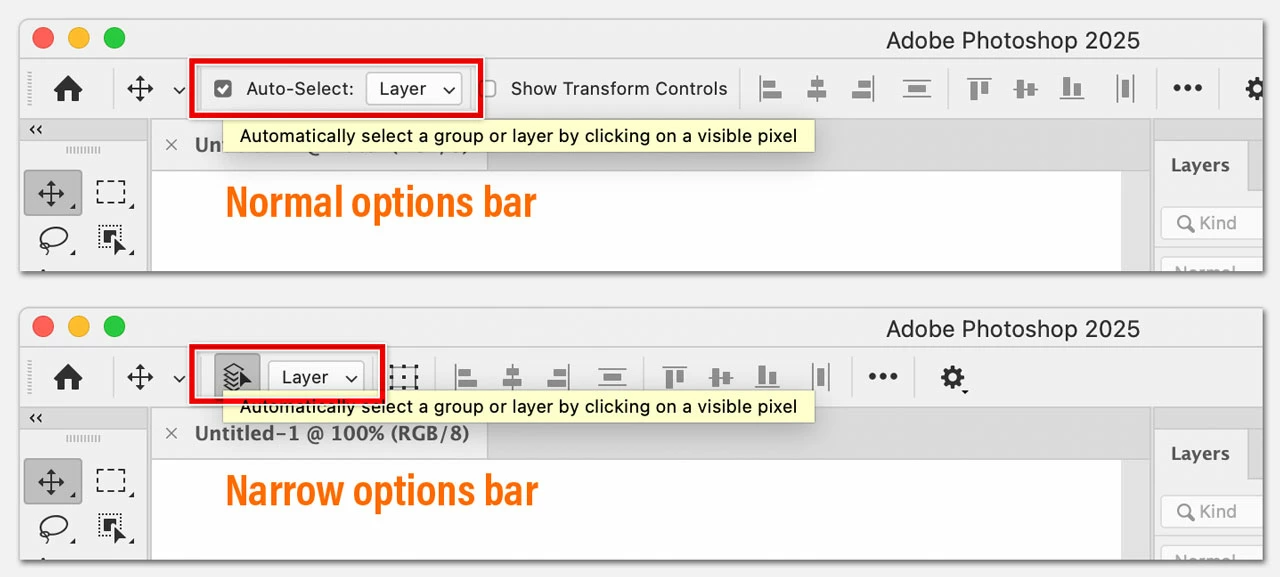
The picture below shows where Auto-Select is in Photoshop 2025. It’s on the options bar for the Move tool, which means you’ll see it only if the Move tool is selected.


The top is how it looks by default, the bottom shows how it looks if the option Use Narrow Options Bar is enabled, usually to save space on smaller screens.


1 reply

Conrad_C
Community Expert
Conrad_CCommunity ExpertCorrect answer
Community Expert
August 23, 2025

The picture below shows where Auto-Select is in Photoshop 2025. It’s on the options bar for the Move tool, which means you’ll see it only if the Move tool is selected.


The top is how it looks by default, the bottom shows how it looks if the option Use Narrow Options Bar is enabled, usually to save space on smaller screens.