Miker2426
Inspiring
September 19, 2018
Answered

What happened to the Curves reset button?

  • September 19, 2018
  • 1 reply
  • 2418 views

It used to be that there was a reset button in the Curves adjustment. If you held down alt/opt, the Auto button would change to reset, which you could click to zero out any changes you may have made to Curves. That option is now gone. Is there now another simple way to reset the curves adjustment?

Thanks in advance for any help or advice.
This topic has been closed for replies.
Correct answer davescm

Hi

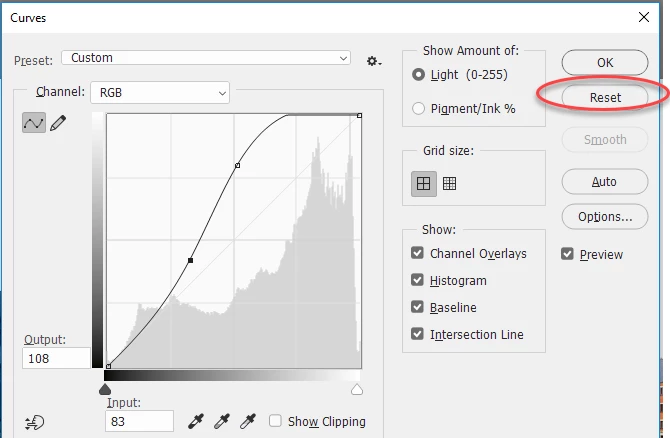
It still works here (windows 10 with Photoshop 19.1.6) screenshot below with Alt key pressed.

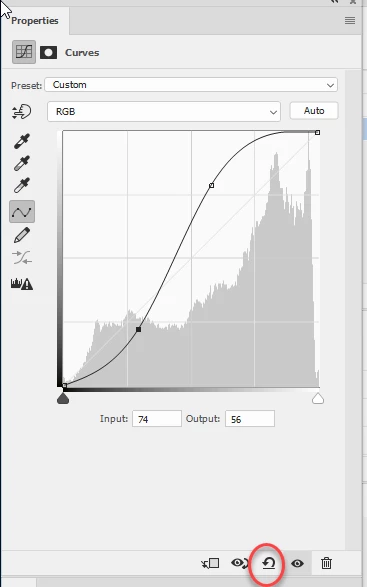
On a curves adjustment layer it is slightly different. The reset button is at the bottom of the panel:

Dave

1 reply

davescm
Community Expert
davescmCommunity ExpertCorrect answer
Community Expert
September 19, 2018

Hi

It still works here (windows 10 with Photoshop 19.1.6) screenshot below with Alt key pressed.

On a curves adjustment layer it is slightly different. The reset button is at the bottom of the panel:

Dave

Miker2426
Miker2426Author
Inspiring
September 20, 2018

I only use the adjustment layers, and that icon was exactly what I was looking for!

Thanks a million, @Dave!