Participant
April 9, 2021
Question

What is a .p_s_ file?

  • April 9, 2021
  • 5 replies
  • 2099 views

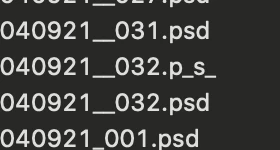
Recently I have had a few instances when a file is saved as a .p_s_ file instead of a .psd - I've caught it and re-saved when I still have the file open in Photoshop, and am able to save it as .psd, so I'm guessing some kind of error happens while it's saving, but I'm not sure what exactly. Has this happened to anyone else? If I close the file and try opening it again, Photoshop doesn't recognize the file type, nor does my computer (it says there is no application set to open the document). I'm using Catalina 10.15.7 and running Photoshop 22.3.0 through CC.
 

This topic has been closed for replies.

5 replies

Known Participant
May 6, 2021

This is 100% an app error, not a user error. I've had multiple files save with the extension .p_s_ even when starting from File > New and saving as the default filetype. Without me typing anything, it will sometimes suggest "Untitled-1.p_s_". And when I switch it to .psd, it gives a dialog box asking if I'm sure I want to save as .psd instead of the default Photoshop filetype .p_s_.


It happens most frequently when I, while having multiple files open, make drastic changes to a PSD and try File > Save As.


Photoshop 22.3.1 and Big Sur 11.3.1

lieslkadile1
Participant
May 12, 2021

this happened for the first time today for me. I just saved as a PSD. very odd.

davescm
Community Expert
Community Expert
May 12, 2021

Can you please post that issue, with your screenshot showing the Photoshop message, at the link below which is monitored by Adobe developers


https://feedback.photoshop.com/photoshop_family


Dave


Participant
May 3, 2021

This is happening to me, too, but it's when I'm saving a hi-res .jpg using the keyboard shortcut for 'save as.' If I try to type '.jpg' the 'save as' window closes as soon as I hit 'j.' When I keyboard shortcut 'save as' a second time this does not happen. It doesn't happen every time but fairly often - and often when I have many hi-res images open at the same time.

SR+AR
Participant
April 29, 2021

Hello.
Sahil.Chawla method works but it is still a problem while save a PSD document. I realized since yesterday when I opened RAW files from the camera en saved them with retouch layers to PSD. Some files were saved normal as .PSD but others saved as .p_s_

So, Sahil if you are from Adobe, maybe can talk there that is not a type error but an app error. 


Regards, 


Alejo R. 


Bojan Živković11378569
Community Expert
Community Expert
April 10, 2021

You can batch rename files using Adobe Bridge. Go to Tools > Batch Rename...

Sahil.Chawla
Adobe Employee
Adobe Employee
April 9, 2021

Hi there,

This looks like a type error, and the psd extension got changed to p_s_ try renaming it to .psd and see if you're able to open the file in Photoshop.

Hope this helps.
Regards,
Sahil

ledahlstrAuthor
Participant
April 12, 2021

This worked, thank you so much! I didn't think to try it.