
Participant
December 30, 2021
Answered

What is happening with the UI in Photoshop 2022?

  • December 30, 2021
  • 2 replies
  • 1205 views

So, I'm completely lost here... When I load a PNG (or JPG) file into Photoshop, the background, which is usually that dark gray, still shows the opening screen. I minimize the window and bring it back up, the gray comes back. There seems to be a huge amount of latency on using the tools because when I pick the magic wand tool to select certain things, the selection, shown by "dancing ants", doesn't show up. If I minimize the window and bring it back up, the selection finally shows up, but nothing is moving. Latency has now increased and hovering over tools to select anything is slow. It also locks up all the time now... I can't even make a new file.


I can't use PS as it is because it is affecting my job at work. I didn't have this issue last week, but now it looks like PS has gone backward with an "update" as Windows does sometimes. Things work fine and then it gets updated and stuff breaks that worked fine. Back in the day, before anything went out to the public, things were tested thoroughly because of stuff like this. That has gone out the window over 10 years ago on almost anything being produced these days.
This topic has been closed for replies.
Correct answer Ged_Traynor

Hi

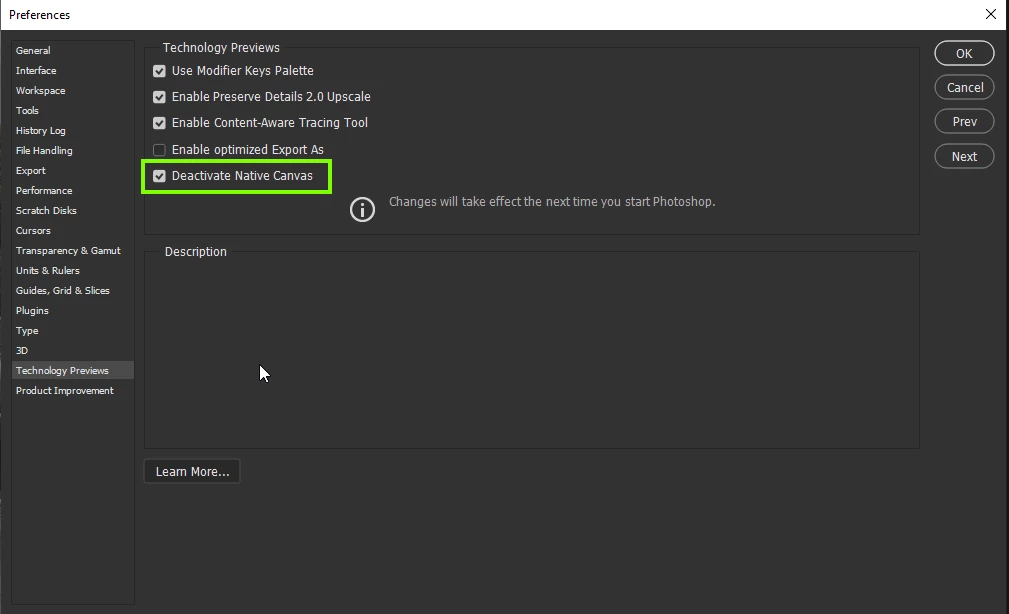
Try enabling this option in preferences and retarting Photoshop to see if it help with the Home Screen issue

2 replies

Ged_Traynor
Community Expert
Ged_TraynorCommunity ExpertCorrect answer
Community Expert
December 30, 2021

Hi

Try enabling this option in preferences and retarting Photoshop to see if it help with the Home Screen issue

Participant
December 30, 2021

Thanks for the SS of where it is. This fixed my issue for what was going on. I still installed the last version of PS and used that without a hitch for what I needed. Thanks again!

Legend
December 30, 2021

Go to Preferences > Technology Previews... and check "Disable Native Canvas" - then restart Photoshop. Does the problem still occur?

Participant
December 30, 2021

This actually worked. Seems odd that one option would completely mess up the program because when I tried to open another file when the first one was screwy, it said it was open, but nothing was there and the bottom left where the dimensions and dpi are shown, was flickering like something was wrong.

Legend
December 30, 2021

"Disable Native Canvas" forces Photoshop to use the old OpenGL drawing which is now deprecrated.  This indicates you might have an older graphics card that doesn't support DX12 (native Windows GPU acceleration). Photoshop uses native Windows GPU accelaration by default.