Participant
May 2, 2017
Answered

What is the best editing technique to whiten a dog's stained mouth

  • May 2, 2017
  • 1 reply
  • 2909 views

I am new to photoshop cc.  I would like to whiten a stained beard around a dog's mouth.  I have tried painting with a whiter color but it does not look natural.  I appreciate any answers and advice.

Thank you

    This topic has been closed for replies.
    Correct answer davescm

    I would do it in three stages (note a higher resolution image would have been better to demonstrate but hopefully you get the idea)

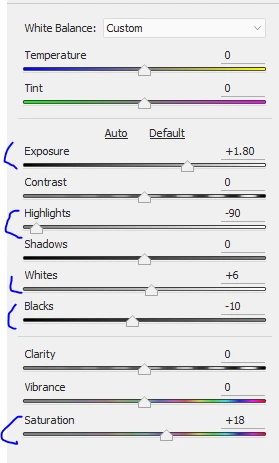
    1. Make the image a smart object and use the camera raw filter to correct the underexposure and increase the satruration
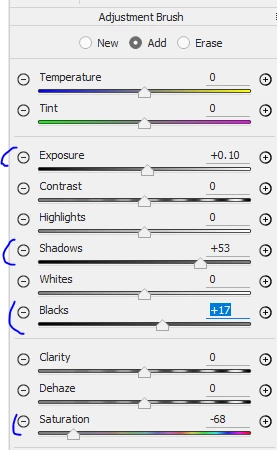
    2. Add a local adjustment brush in camera raw filter and increase the exposure in the shadows and reduce saturation around the mouth
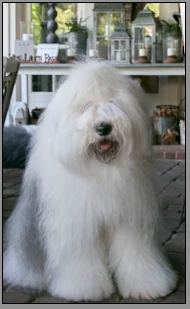
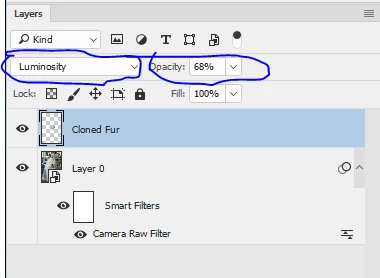
    3. Add a new layer and clone some of the whiter fur around the mouth. Set the blending mode of this new layer to luminosity and turn the opacity down till it looks right
    I hope that helps you

    Dave

    1 reply

    Chuck Uebele
    Community Expert
    Community Expert
    May 2, 2017

    Hard to say without seeing the photo.

    KbfnsdAuthor
    Participant
    May 2, 2017

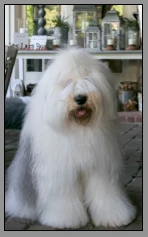
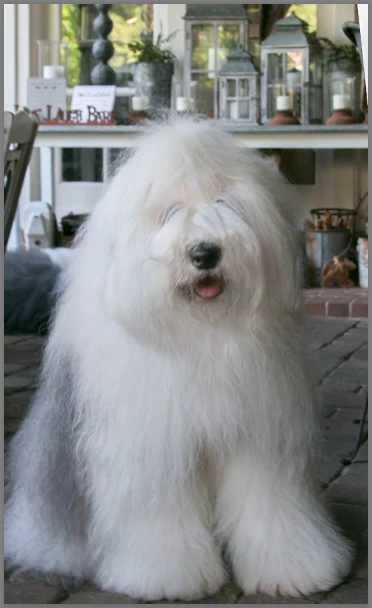
    Here he is.  His mouth looks darker in the picture than it actually is.  I am not sure what the best tool and technique are to lighten.  Thank you for your help.

    davescm
    Community Expert
    davescmCommunity ExpertCorrect answer
    Community Expert
    May 2, 2017

    I would do it in three stages (note a higher resolution image would have been better to demonstrate but hopefully you get the idea)

    1. Make the image a smart object and use the camera raw filter to correct the underexposure and increase the satruration

    2. Add a local adjustment brush in camera raw filter and increase the exposure in the shadows and reduce saturation around the mouth

    3. Add a new layer and clone some of the whiter fur around the mouth. Set the blending mode of this new layer to luminosity and turn the opacity down till it looks right

    I hope that helps you

    Dave