What is the best way to lay out a sample color Chart (see photo)
I am a Beginner and I have Adobe CS5 with PS and Illustrator.
I want to take photos of 12 of these little dog collar strap samples. I want to cut them out (?) and arrange them and label them and then put that document into a listing on Etsy so that buyers can see the real choices for their dog collar straps.
I know I must take 12 photos first. But do I use Photoshop or Illustrator to arrange them into rows and label them? Do I use PS to select and cut and then arrange them into Illustrator? Does it matter what tool i use for selecting? Is there some kind of a grid I can turn (like I saw in Illustrator) that will help me keep the rows neat? Should I just use this sample board here and just select and drag from that? 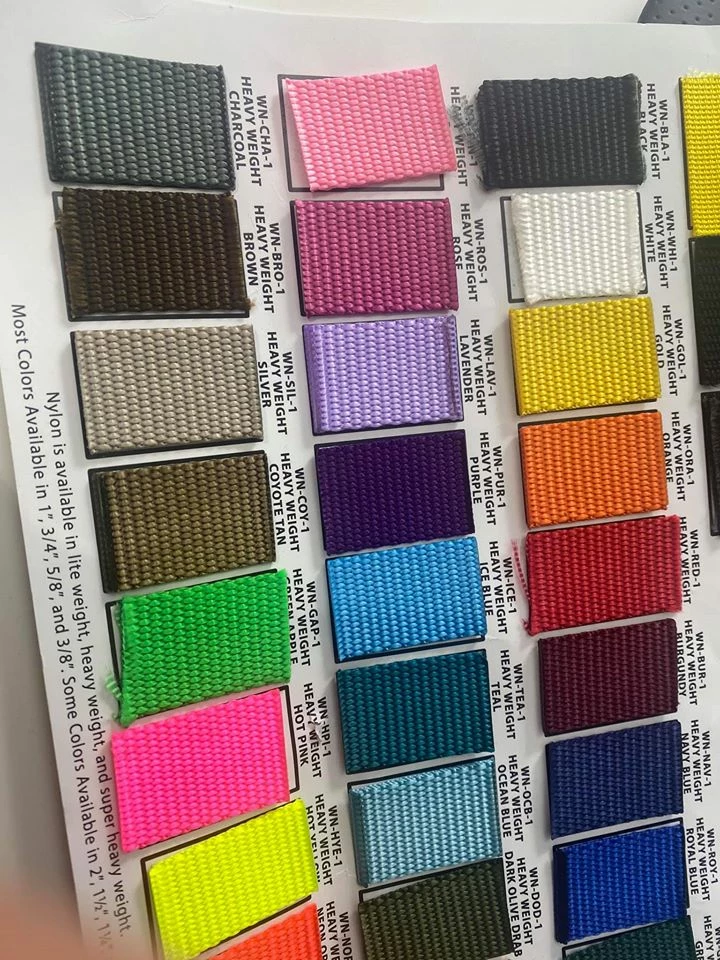
Keep it simple and Please do not overwhelm me with alot of technical language I will not understand it. thank you very much
 AdChoices