
Inspiring
February 16, 2026
Question

what tool to unbend a simple arc ?

  • February 16, 2026
  • 3 replies
  • 0 views

Hi,

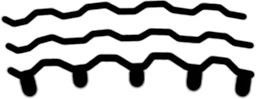
Draw a simple black line brush size 10 but as an arc, left to right, then repeat that 20 pixels or so north and repeat again.

Now try and bend the three lines downwards to get three straight lines same relationship to each other , no line must go thinner, no gap thinner.

Pshop has not , as far as I can see, added any basic geometry transform tools since its launch in 4.1 days.

Distort, Scale, Warp, Skew, cannot handle this simple need.

I had traced a tyre tread and as the pic was at an angle got the attached, just need to un bend it as a plan of the tread.


Merlin
 

    3 replies

    Trevor.Dennis
    Community Expert
    Community Expert
    February 16, 2026

    Lazy Nezumi Pro might work, if you are using Windows. It’s scripting can be controlled to give line patterns like below.  The trick is to combine with LNP Ruler presets like Parallel Lines and not move the cursor too quickly.


    I think you would need to modify the ‘Square’ script.  You might get some help with that here.

     Guillaume Stordeur is extremely helpful, and would almost certainly give you guidance.


    Trevor.Dennis
    Community Expert
    Community Expert
    February 16, 2026

    I just noticed that you mentioned an arc.  Using Ellipse instead of Parallel lines would do that.


    Conrad_C
    Community Expert
    Community Expert
    February 16, 2026

    This statement is not true: 

    Pshop has not , as far as I can see, added any basic geometry transform tools since its launch in 4.1 days.


    There have actually been a number of warp additions since then, such as Perspective Warp. But the solution in the demo below is Edit > Transform > Warp, which offers a choice of warp envelope shapes. I chose Arch.


    After un-bending, it turns out there are still distortions in the tread that was traced. So next, I used Edit > Transform > Distort to align the tracing more closely with the grid that was made visible for reference. That makes it look like a better plan view.


    At the end, you see that I go into Arch again because I realize it could have been unbent a little more. Instead of applying Arch a second time, it might be better to convert the layer to a Smart Object first so that if you need to adjust Arch settings later, it’s still just one adjustment, better preserving image quality. 


    Genius
    February 16, 2026

    Draw these as paths or better yet, use Illustrator.

    Conrad_C
    Community Expert
    Community Expert
    February 16, 2026

    That is an excellent suggestion, because drawing them as vector paths in Illustrator means they will always be sharp and not look jaggy. Illustrator has similar warp tools including Arch, so the demo below shows that. 


    And the nice thing about the Arch warp in Illustrator is that it also includes Distortion controls, so I was able to make the tread more rectilinear using the same feature. All that was left was a simple rotation to level it with the grid.


    So if this was my project, yes, I would have traced the tread as smooth vector paths in Illustrator, and used its Warp effect to un-bend and un-distort it. 


    (Note: To get the vector paths, I used Image Trace on the image. But for an actual project I would have manually traced the shapes for higher accuracy and regularity.)

    Merlin3Author
    Inspiring
    February 16, 2026

    Hi, I never knew the options existed, despite a few mentions of this to Adobe tech, guess they were not aware either !

    I then used arch then distort then another tweak, then some rebrush work.

    I dont have Illustrator.

    perhaps one day Adobe will add an AI one credit, command called make geometrically correct. Maybe even arc something that was straight, radius of arc, scale of arc etc.


    Merlin