
Inspiring
February 2, 2019
Answered

When I change resolution to 300, PS changes from pixels to inches

  • February 2, 2019
  • 1 reply
  • 723 views

Don't remember this before, but

A contest wants image 5500 px on long side-- width and  300 dpi

The tiff image starts 11047 x 7555  and 2400 resolution.

I need it 5500 px on long side 300 dpi jpeg.

I re-sample to 5500 which is fine, but then when I try to get resolution to 300 I'm stumped.

You can't change resolution to 300 with box checked as it brings the width side too small to 688.

If I uncheck the resample box PS switches everything to inches.  Thanks.
    This topic has been closed for replies.
    Correct answer JJMack

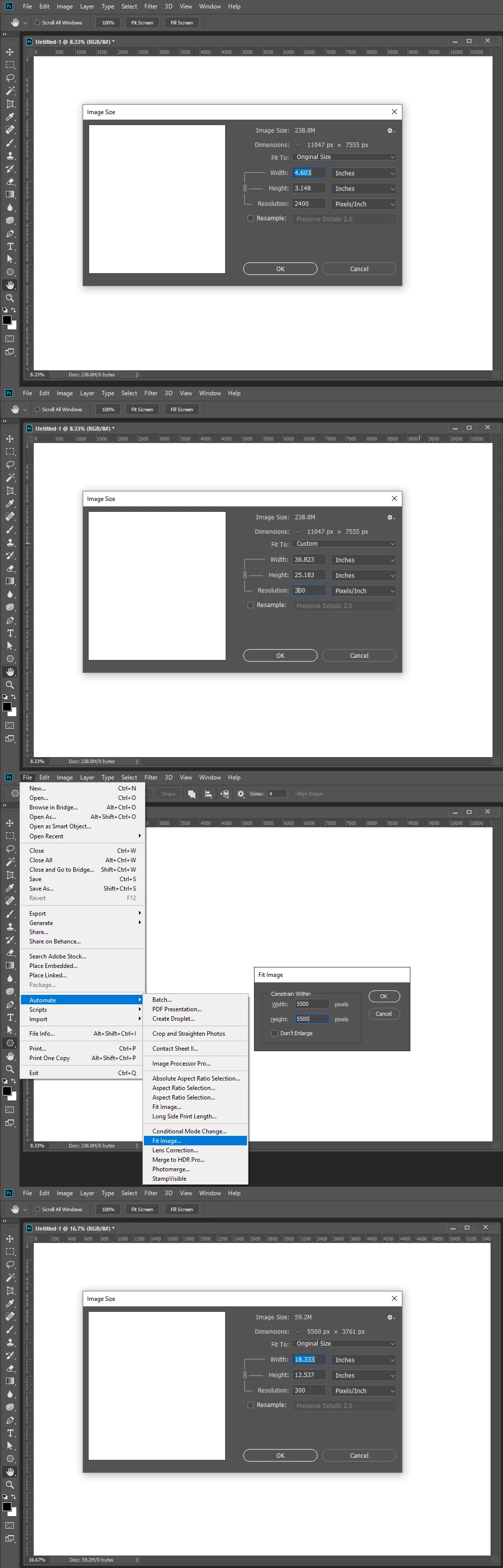
    Look at the document pixel dimensions in your own screen capture 5500px wide 3781 height 18.333" wide 12.5" high

    1 reply

    JJMack
    Community Expert
    Community Expert
    February 2, 2019

    If you use image size uncheck resample and set resolution to 300 it will set your document to have a 300dpi  print resolution.  Then use menu file>automate>Fit Image and the in the fit image dialog  set 5500 in both width and height.  Photoshop will resample your image so the longest side will be 5500 pixels and not change the resolution from 300DPI so the documents longest side will print 18.3"

    5500/300=18.33333333333333333333333333333333  Your document width will be 5500px

    JJMack
    larry45Author
    Inspiring
    February 2, 2019

    but PS still wont let me see/ verify I'm at 5500 pixels, see screenshot:

    JJMack
    Community Expert
    JJMackCommunity ExpertCorrect answer
    Community Expert
    February 2, 2019

    Look at the document pixel dimensions in your own screen capture 5500px wide 3781 height 18.333" wide 12.5" high

    JJMack