
Answered
when I click on gamut warning nothing happens
When I click on gamet warning nothing happens, no table opens on the screen (I'm new at this) does it only work when I'm in RGB not after I've converted to CMYK?

When I click on gamet warning nothing happens, no table opens on the screen (I'm new at this) does it only work when I'm in RGB not after I've converted to CMYK?
Hi
Gamut warning is designed to show you what colours are currently being used in your image that will be out of the gamut (i.e. not available in another colour space.) If you have already converted the image then it will not show anything.
There are two steps to using it
1. In View - Proof Set Up - choose the colour space you want to check against (this could be a CMYK space - or a printer profile)
2. Switch on gamut warning. Any colours in the current image that will be out of gamut when changed to the proof space will be highlighted (see grey in image below)
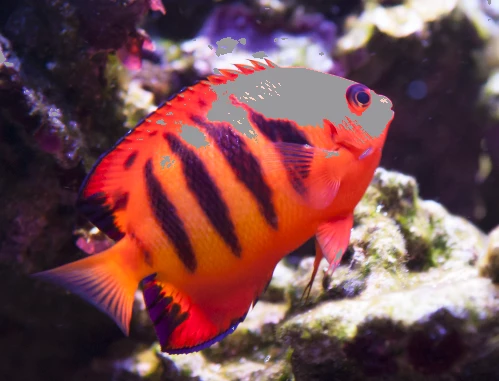
Dave
Already have an account? Login
Enter your E-mail address. We'll send you an e-mail with instructions to reset your password.
 AdChoices