Answered
when i copy a layer it loses color
Hi, im copying a layer from one psd file and pasting on to another psd file in photoshop. But when i pasting that layer it loses it's color. Why is that?

Hi, im copying a layer from one psd file and pasting on to another psd file in photoshop. But when i pasting that layer it loses it's color. Why is that?
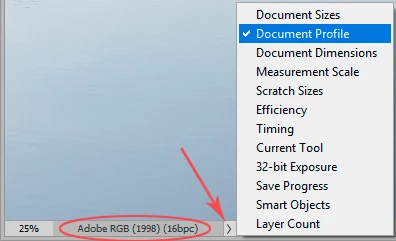
It's because one of your files is missing an embedded color profile. Always make sure there is an embedded profile.
As long as there is a profile, it will be correctly converted when pasting into the target document.
Already have an account? Login
Enter your E-mail address. We'll send you an e-mail with instructions to reset your password.
 AdChoices