wyldr7667076
Participating Frequently
July 8, 2018
Answered

When Zoomed In To 600% I Get A Grid Pattern...

  • July 8, 2018
  • 5 replies
  • 5109 views

Im using Adobe Photoshop CS4 & when i zoom in to 600% or more i get a white grid pattern (as you can see by the screenshot i provided). I zoom in that much to do precise work &/or adjustments & with that grid in the way at 600% zoom its just right in the way. I havent used CS4 long so is that normal for it to do or do i have a glitch or something?
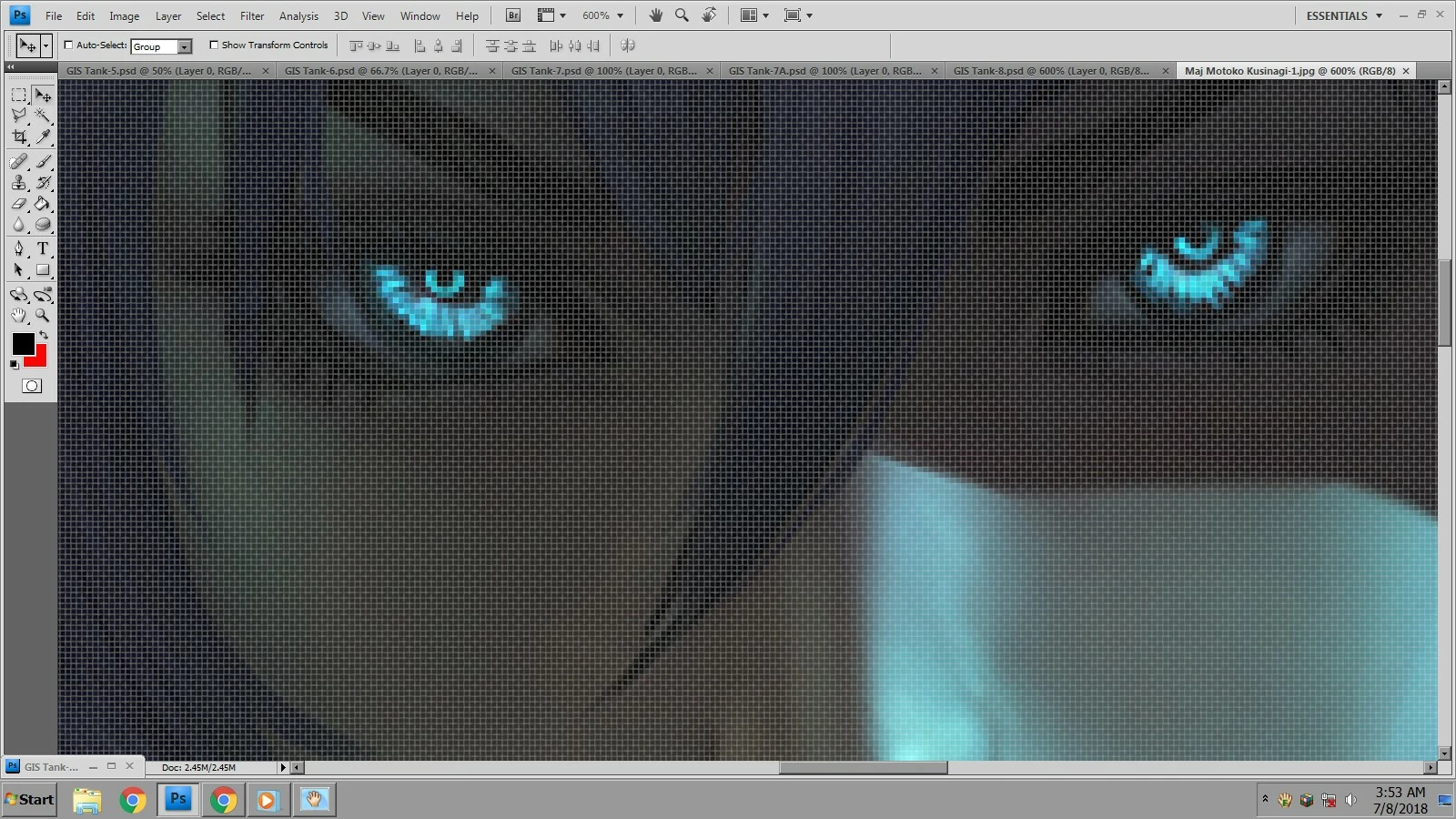
Thank you in advance for any & all help

    This topic has been closed for replies.
    Correct answer davescm

    It is the pixel grid.

    Turn it on or off in View - Show - Pixel Grid

    Dave

    5 replies

    wyldr7667076
    Participating Frequently
    July 13, 2018

    Thank you gener7, now i understand whats going on. It automatically comes on after you hit 600% in the Photoshop CS4, i was using the PS2 before & it didnt have that feature, or at least it never did it when i zoomed. I zoom into 1600% sometimes for very fine work & i wasnt aware the newer versions had that. Now because im a big enough person & they deserve it, i must swallow my pride & apologize to someone...........

    Umm...Dave...Hi....Hows it going? I dont know if you heard buddy but believe it or not...i was WRONG...An i owe you an apology for the way i treated you & your attempt to help me. Im sorry i acted & said what i did & i have learned a little more tollerance, patience & understanding from this. I hope you have a great weekend & can find it in your heart to forgive me.

    Thank you to all of you who hung in there with me & helped, i appreciate it & all of you greatly. Im going to go stick my head in the sand & meditate xD

                                                        ​                         "Catch Ya On The Flip Side!"

    davescm
    Community Expert
    Community Expert
    July 14, 2018

    No harm done - glad you got it sorted

    Dave

    gener7
    Community Expert
    Community Expert
    July 14, 2018

    Just trivial at this point and maybe some versions behave differently, but enter 500% zoom-no pixel grid/enter 501% pixel grid shows up. Just a fun fact providing Pixel Grid is checked on.

    Terri Stevens
    Legend
    July 11, 2018

    Hope Dave's explanation now suffices as he knows what he's talking about. However it's not necessary to toggle the grid through the menu as all you need to do is press ctrl-h or cmd h on the Mac and it will temporarily turn the grid pattern off while you work on that particular image-it's exactly the same as hiding the marching ants for a selection.

    Terri

    Trevor.Dennis
    Community Expert
    Community Expert
    July 11, 2018

    Wow Terri.  I can't believe I had not realised that Ctrl H also toggled the Pixel Grid.  I turn it off and on so often, I have an action set up triggered with a G-key',   I'll be deleting the action and using Ctrl h from now on. 

    Terri Stevens
    Legend
    July 11, 2018

    glad I'm useful sometimes Trevor

    wyldr7667076
    Participating Frequently
    July 10, 2018

    So sorry its taken me this long to respond, there was some problems here in my neighborhood to deal with, so anyway here we go

    No davescm, i wish it was as easy & no-brained like that but as you can see by the pic i included, the top showing the Grid on at 500% Zoom & the lower showing the Grid on at 600% Zoom & you can also see the white colored grid pattern i reffered to in the original post.

    An c.pfaffenbichler, here ya go, the pic of my View/Show -

    davescm
    Community Expert
    Community Expert
    July 10, 2018

    Yes that is the pixel grid. Uncheck it in your last screen shot (5th from the bottom of the menu) and it will go off.

    Dave

    wyldr7667076
    Participating Frequently
    July 11, 2018

    No it is not, it is already unchecked. Evidently you didnt see the huge double screenshot i posted just above your response or read my last post sir, so i'll repeat myself. As i said in the original post the white grid pattern DOES NOT show up until i hit 600% Zoom, so right there that should have told you it is not the Pixel Grid. Also just earlier in the second post right above your post i stated that the first picture shows the image at 500% Zoom with the Pixel Grid ON (its the blue lines), an the second picture shows the image at 600% Zoom with the Pixel Grid ON (the blue lines) and you can now see the White Grid Pattern showing. So NO the white grid pattern is NOT the Pixel Grid, but the blue lines in both pictures are . I took the 2 screenshots (both with the PS Pixel grid in blue on) to show that the white grid pattern is not the PS Pixel Grid your reffering to. It cant be tthe PS Pixel grid for 3 reasons.  1. PS Pixel Grid is not capable of showing 2 different grid sizes at the same time. 2. It is also not capable of showing the Pixel Grid in 2 different colors at the same time. and 3. When the Pixel Grid is turned on it stays on for all images & all sizes until you turn it off, so why would it just show up after i hit 600% Zoom? So please sir, if you do not have anything relevant to contribute to my query.....please stop posting that its the Pixel Grid...Thank you...

    davescm
    Community Expert
    davescmCommunity ExpertCorrect answer
    Community Expert
    July 8, 2018

    It is the pixel grid.

    Turn it on or off in View - Show - Pixel Grid

    Dave

    c.pfaffenbichler
    Community Expert
    Community Expert
    July 8, 2018

    Which features are checked under View > Show?