
Participant
October 17, 2017
Answered

Where actions are stored in PS CC 2017?

  • October 17, 2017
  • 2 replies
  • 13540 views

Hi!

I cannot find an action that I made and I want to send to someone. Where are they stored? I checked in Program Files -> Adobe -> Photoshop CC -> Presets -> Actions but it's not there. Besides, there are only a few actions , and I have loaded a lot more! Somebody tipped me off to try C:\Users\<my user name>\AppData\Roaming\Adobe\Adobe Photoshop CC 2017\Presets\Actions but this folder is empty. Could you please help me with that problem?
    This topic has been closed for replies.
    Correct answer D Fosse

    Actions are normally stored with your preferences.

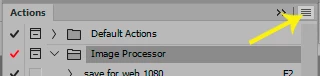
    Save out actions from the fly-out menu in the panel. You can only save out action sets, not individual actions.

    2 replies

    Participant
    October 17, 2017

    Thank you very much! Indeed, they are in the C:\Users\<my user name>\AppData\Roaming\Adobe\Adobe Photoshop CC 2017\Presets\Actions folder.

    Stephen Marsh
    Community Expert
    Community Expert
    October 17, 2017

    That is one possible location, but not to be taken for granted:

    Prepression: Photoshop – Custom Action File Backup & Migration

    D Fosse
    Community Expert
    D FosseCommunity ExpertCorrect answer
    Community Expert
    October 17, 2017

    Actions are normally stored with your preferences.

    Save out actions from the fly-out menu in the panel. You can only save out action sets, not individual actions.