I don't use it. I gave you a hint on how to influence the sizes of some UI elements.
I don't use it myself. Using CS6 as an example, I'll show you how you can change the minimum values for some panels.
If you add (change) such lines
"$$$/override/Globals/StdPaletteHeight=25"
"$$$/override/Globals/StdPaletteHeight/Large=25"
"$$$/override/Globals/StdPaletteHeight/Mac=25"
"$$$/override/Globals/StdPaletteHeight/Medium=25"
"$$$/override/Globals/StdPaletteHeight/Tiny/Mac=25"
"$$$/override/Globals/StdPaletteHeight/Tiny/Windows=25"
"$$$/override/Globals/StdPaletteHeight/Windows=25"
"$$$/override/Globals/StdPaletteWidth=25"
"$$$/override/Globals/StdPaletteWidth/Large=25"
"$$$/override/Globals/StdPaletteWidth/Mac=25"
"$$$/override/Globals/StdPaletteWidth/Medium=25"
"$$$/override/Globals/StdPaletteWidth/Tiny/Mac=25"
"$$$/override/Globals/StdPaletteWidth/Tiny/Windows=25"
"$$$/override/Globals/StdPaletteWidth/Windows=25"
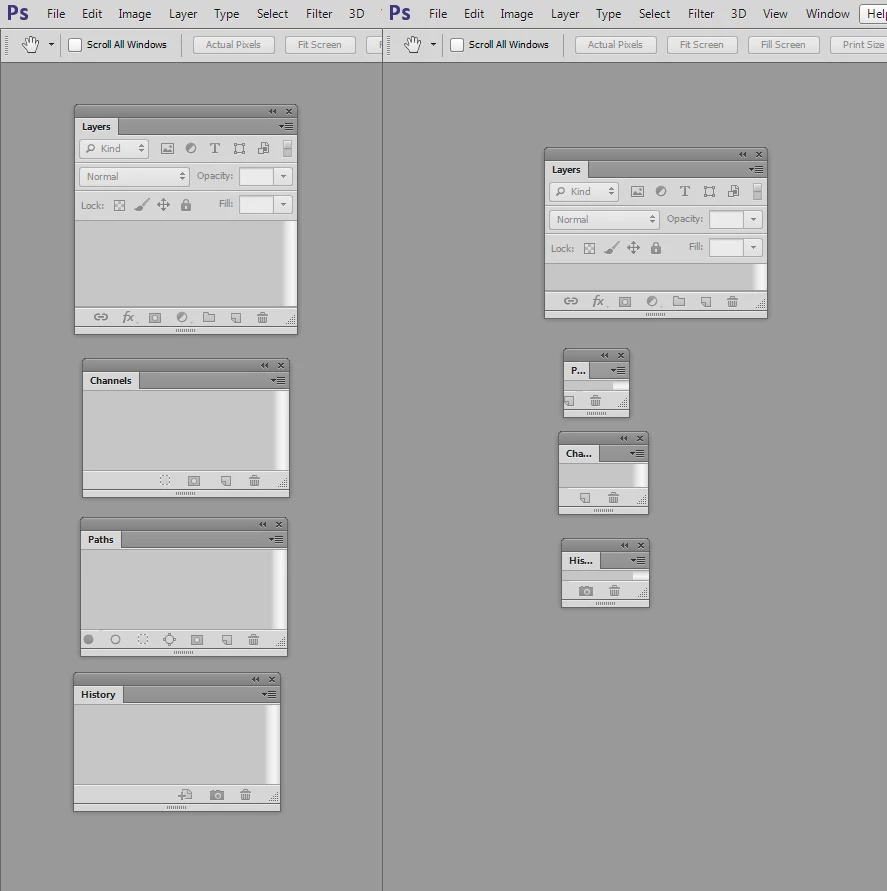
then you can get such dimensions as shown in the screenshot on the right (standard minimum sizes are shown on the left).
It can be seen that not all panels can be reduced arbitrarily. It depends on the minimum sizes of some controls, as in the example in the layers palette.
It is probably not worth adding values that do not exist to the file.
You only need to change the numbers that come after the "=" symbol.
You don't need to add "px".
A complete list of "$$$/override/..." lines can be found in photoshop.exe file. You can also tweak the resources in Photoshop.dll and PSViews.dll.
But this is a question for hackers.
))
 .
.
 AdChoices