
Participating Frequently
December 19, 2020
Answered

Where can I find the simulated airbrush tip?

  • December 19, 2020
  • 1 reply
  • 796 views

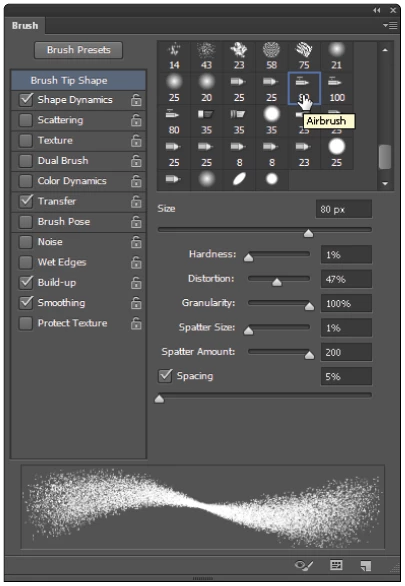
I am looking for the brush seen in the image below. I already loaded the standard brushes but couldn't find the airbrush. I am using Photoshop 2019. Can someone point me in the right direction? Or maybe just upload the .abr file?

Thanks!
 

This topic has been closed for replies.
Correct answer JJMack

Load the legacy brushes

1 reply

JJMack
Community Expert
JJMackCommunity ExpertCorrect answer
Community Expert
December 20, 2020

Load the legacy brushes

JJMack
jaschagAuthor
Participating Frequently
December 20, 2020

Great! Thanks!

For anyone who has the same problem: The option is in the brush panel > options (top right corner) > Legacy Brushes. The airbrush can be found in the default brushes folder.