Participant
January 13, 2019
Answered

Where did the brushes go?

  • January 13, 2019
  • 1 reply
  • 2490 views


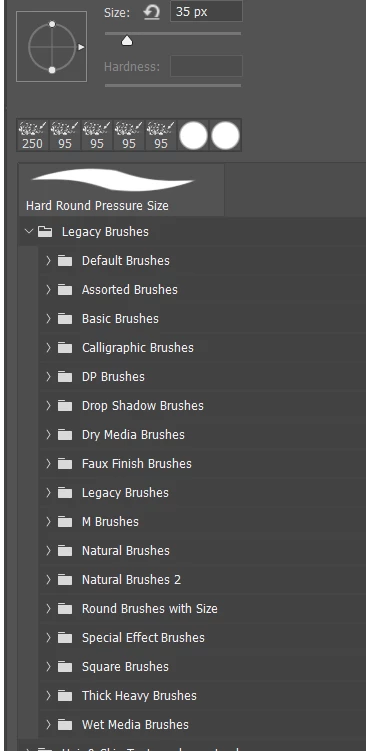
The only folders for brushes I see (and this is AFTER resetting default brushes) are General, Dry Media, Wet Media, and Special Effects.
Hmmmm I don't know what happened to the other folders like Thick Heavy Brushes....etc. When I click on Import there is nothing there to import. How can I get these other brushes back?
    This topic has been closed for replies.
    Correct answer Trevor.Dennis

    We don't what steps you are taking, so I might be telling what you already know.

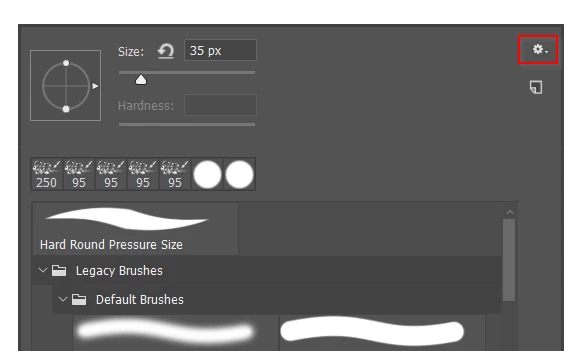
    Right click inside the canvas with the brush tool selected,  and click on the wee cog icon

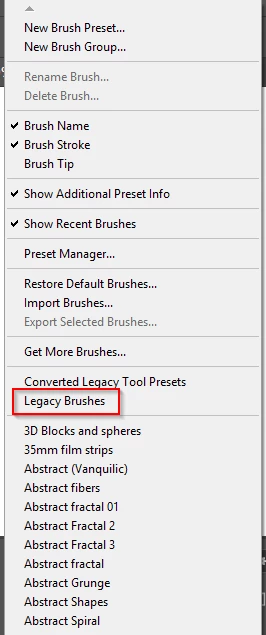
    Choose Legacy Brushes

    Twirl it open for all the missing groups

    Check this thread for  more information

    Re: Changing the brush without changing the tool

    1 reply

    Trevor.Dennis
    Community Expert
    Trevor.DennisCommunity ExpertCorrect answer
    Community Expert
    January 13, 2019

    We don't what steps you are taking, so I might be telling what you already know.

    Right click inside the canvas with the brush tool selected,  and click on the wee cog icon

    Choose Legacy Brushes

    Twirl it open for all the missing groups

    Check this thread for  more information

    Re: Changing the brush without changing the tool

    TabathavmAuthor
    Participant
    January 13, 2019

    Yes! That's it! Thank you so much!