Participant
October 27, 2023
Answered

Where is Constrain Path Dragging in Photoshop 2024

  • October 27, 2023
  • 3 replies
  • 1009 views

I've been using Photoshop and Illustrator since 1992, and most updates I've continued to use Legacy settings. I've just installed Photoshop 2024 and due to complications I couldn't migrate my settings from the previous Photoshop.

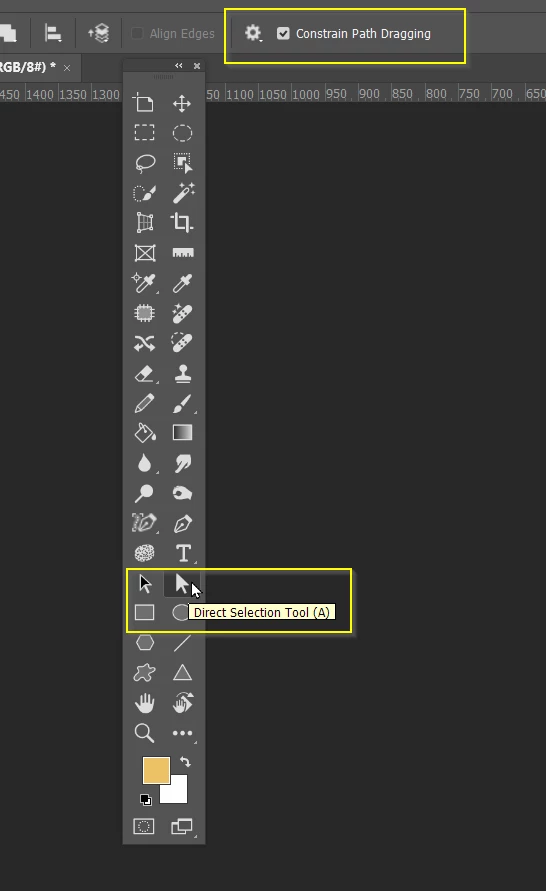
I'm trying to find where to constrain the anchor points of a path drawn with the pen tool, when you are resizing a segment of the path.
Previously you could click 'Constrain Path Dragging', but I can't find it any more.
This topic has been closed for replies.
Correct answer Trevor.Dennis

Hi Lee.  When you use an app like Photoshop long enough, so much of what we do becomes muscle memory.

Things you've done a thousand times without thinking become a mystery when you stop to think about it, or someone asks you.  I do it all the time.   It's like typing.  Our fingers know where every key is, but I couldn't tell you where most of the keys are without looking.


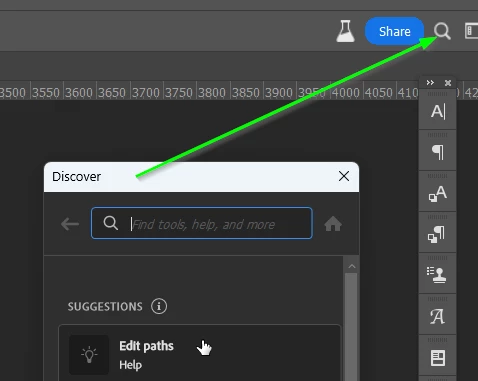
BTW  The Discover tool can be useful in these situations.


3 replies

Participant
November 5, 2023

Thank you everyone. Of course I found it one minutes after posting - I was getting too frustrated to look properly!

Jeff Arola
Community Expert
Community Expert
November 4, 2023

Could be that you have Enable Narrow Options Bar checked in the photoshop Preferences>Tools.

In that case the words and checkbox are replaced by an icon.


Adobe Photoshop 2024>Settings (Preferences)>Workspace (mac)

Edit>Preferences>Workspace (windows)


Participant
November 4, 2023
I found it, but on Windows, it is under Edit > Preferences > Workspace.
Thanks to helping me know what to look for!
Trevor.Dennis
Community Expert
Trevor.DennisCommunity ExpertCorrect answer
Community Expert
October 27, 2023

Hi Lee.  When you use an app like Photoshop long enough, so much of what we do becomes muscle memory.

Things you've done a thousand times without thinking become a mystery when you stop to think about it, or someone asks you.  I do it all the time.   It's like typing.  Our fingers know where every key is, but I couldn't tell you where most of the keys are without looking.


BTW  The Discover tool can be useful in these situations.


Participant
November 3, 2023

I have the same issue as Lee above.  I know where it is supposed to be, but the check box to select the option is missing from my Ps as well. How do you get it to come back?