
Question
Where is "Use Channel to modify dither/lossy/color setting" in Save for Web GIF now?
I realize this question is probably terribly outdated.
But on my old computer i had Photoshop CS3 open today, and remembered that the Save for Web & Devices function used to have some extra options under GIF.
We used to be able to further modify the amount of Dither or Lossy or even modify the color setting with an Alpha channel.
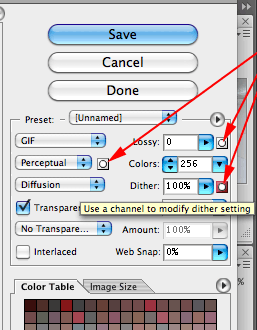
Which i thought was a pretty cool way to further reduce file size for GIFs.
Obviously that was a long time ago and I haven't used the versions between CS3 and now so i certainly am in no position to complain about features going away.
I just wanted to ask, is this feature still available but in a different place? Or is there a workaround to achieve a similar outcome?
Or is reducing GIF size not really a thing anymore?
 AdChoices