Inspiring
June 14, 2017
Answered

Where should IBLs for Photoshop CS6 be manually installed?

  • June 14, 2017
  • 1 reply
  • 1157 views

Recently, I downloaded some IBLs (Image-based Lights) for Photoshop, from Adobe. (Presumably, these lights will be extras to the ones that are currently installed.) My Adobe Extension Manager does not work (even if to use this would be the official course of action), so I think that these IBLs will need to be installed manually. My question is: where ought these lights to go? I look in my Home Library (in Mac OSX Sierra) > Application Support, but nowhere in this folder can I see any folder in which one OBVIOUSLY ought to store the lights. I would guess that it would be somewhere in the folder (in Application Support) entitled Photoshop CS6, but what folders are in there certainly do not invite one to store IBLs in them.

With thanks in advance, for any helpful reply,

T.T.F.
    This topic has been closed for replies.
    Correct answer davescm

    You don't need to install them. An IBL is just a TIF file (The default is Default IBL.TIF). You can store them wherever you want.

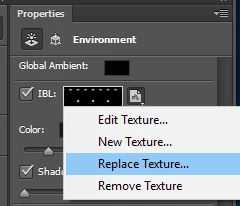
    When you come to use them just use Replace Texture and navigate to where you stored them.

    The default IBL for Windows is stored  in C: > Program Files > Adobe > Adobe Photoshop CS6 (64 bit) > Presets > Lights

    Dave

    1 reply

    davescm
    Community Expert
    davescmCommunity ExpertCorrect answer
    Community Expert
    June 14, 2017

    You don't need to install them. An IBL is just a TIF file (The default is Default IBL.TIF). You can store them wherever you want.

    When you come to use them just use Replace Texture and navigate to where you stored them.

    The default IBL for Windows is stored  in C: > Program Files > Adobe > Adobe Photoshop CS6 (64 bit) > Presets > Lights

    Dave

    Inspiring
    June 14, 2017

    Thanks a lot for that, Dave. It had me really perplexed, and I could find nothing relevant on the Web (except for your answer).

    T.T.F.