Answered
Which one is last layer?
Layer 6 is background layer or Group3? and is here background layer last layer? or not? Given that last 3 layers are hidden.
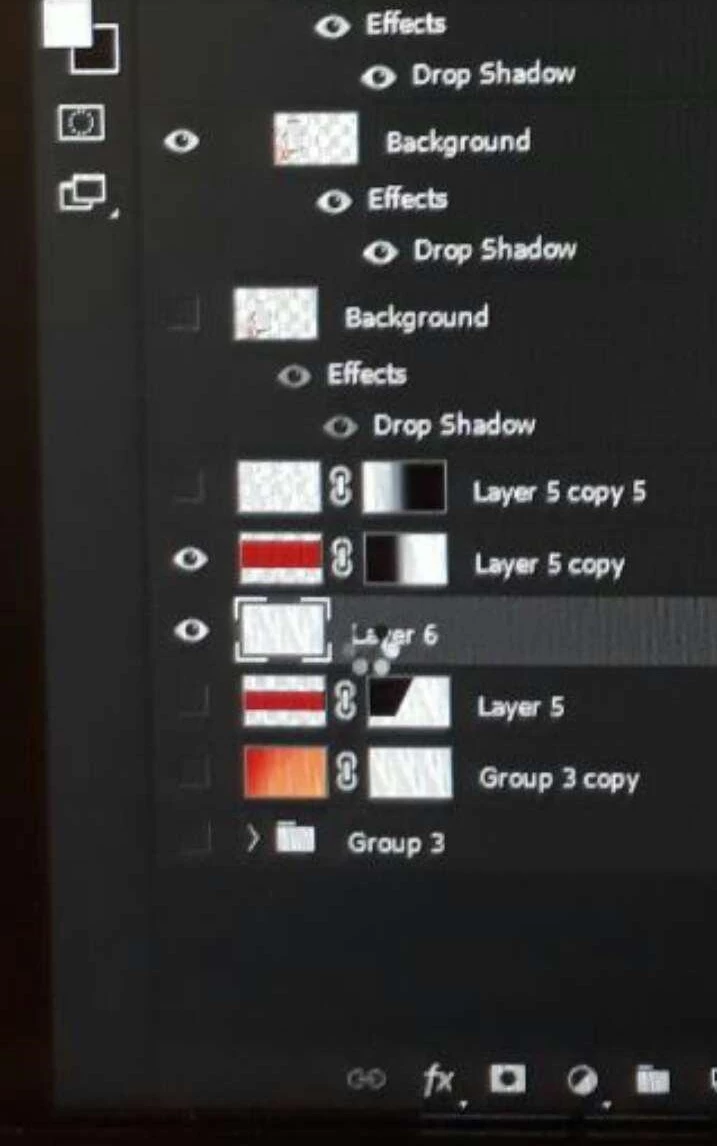

Layer 6 is background layer or Group3? and is here background layer last layer? or not? Given that last 3 layers are hidden.
Hi
You have several layers that have been named “Background”; naming them as such does not make them Background layers.
A Background layer will be assigned a lock icon and you cannot change its opacity, blending mode, or stacking order. It will always be at the bottom. To convert it into a regular layer, one way is to click the lock icon.
To convert any layer into a Background layer, choose Layer > New > Background from Layer. You can only have one Background layer, as c.pfaffenbichler said.
Background layers were required through PS 5. Since PS 5.5 came out with support for transparency, the Background layer is not required and there is no reason to have one. (Note: I did not say CS5 and 5.5. This happened before Creative Suite.)
Your bottom layer is inside of hidden Group 3. If you have a bottom layer called Background and you can’t reorder it in the Layers panel and you can‘t erase to transparency and blending modes are grayed out, that is your Background layer. Otherwise you don’t have one.
Jane
Already have an account? Login
Enter your E-mail address. We'll send you an e-mail with instructions to reset your password.
 AdChoices