Participant
December 28, 2019
Answered

White dogs on white snow on a sunny day

  • December 28, 2019
  • 4 replies
  • 489 views

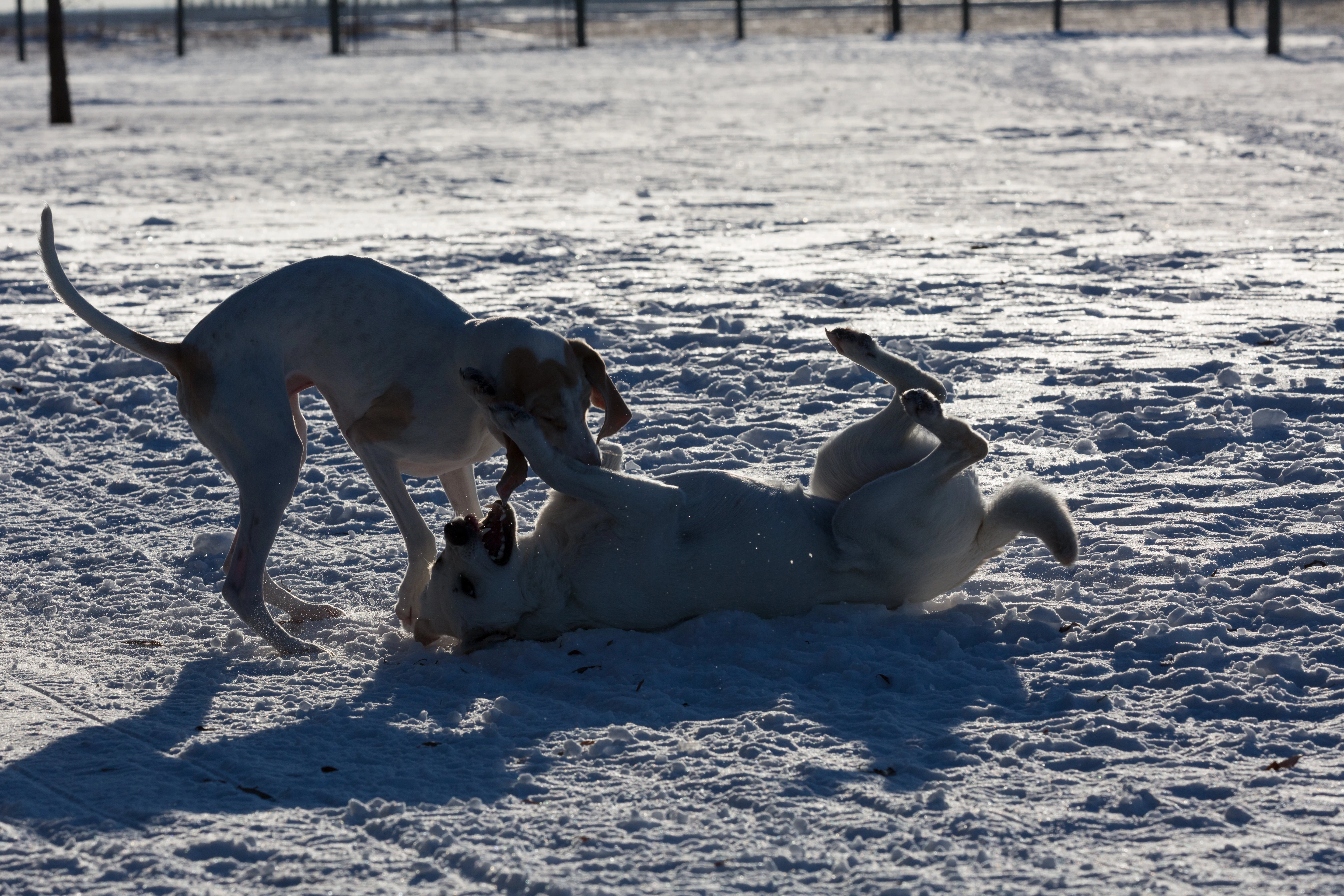
I'm very new with Photoshop, would there be any hope recovering the action below with two white dogs playing.  I have the image in RAW format, collected with a 5D MkIII.  Interested in some opinions or would be better for the trash bin.


This topic has been closed for replies.
Correct answer D Fosse

This the most difficult lighting situation imaginable - shot directly into strong sunlight. What you should have had, is a flash unit on the camera. But of course it's unrealistic to walk around with that the whole time.


This is using the full dynamic range of the camera sensor, probably 12-14 full stops, and you will need the full raw data to do anything about this.


I'm not sure I would recommend even trying. It will very quickly look artificial. But if it's an important image and you feel you have to at least try:


First get rid of the strong blue cast from the sky, and then raise the overall exposure to whatever you want. Do this in ACR to get all the data (I just did it with Curves here). It will still inevitably blow out the highlights. Here's a trick to retrieve them: Duplicate the original version, and compress it towards the highlights by dragging the output black slider far to the right. Put this layer on top in Darken blend mode:
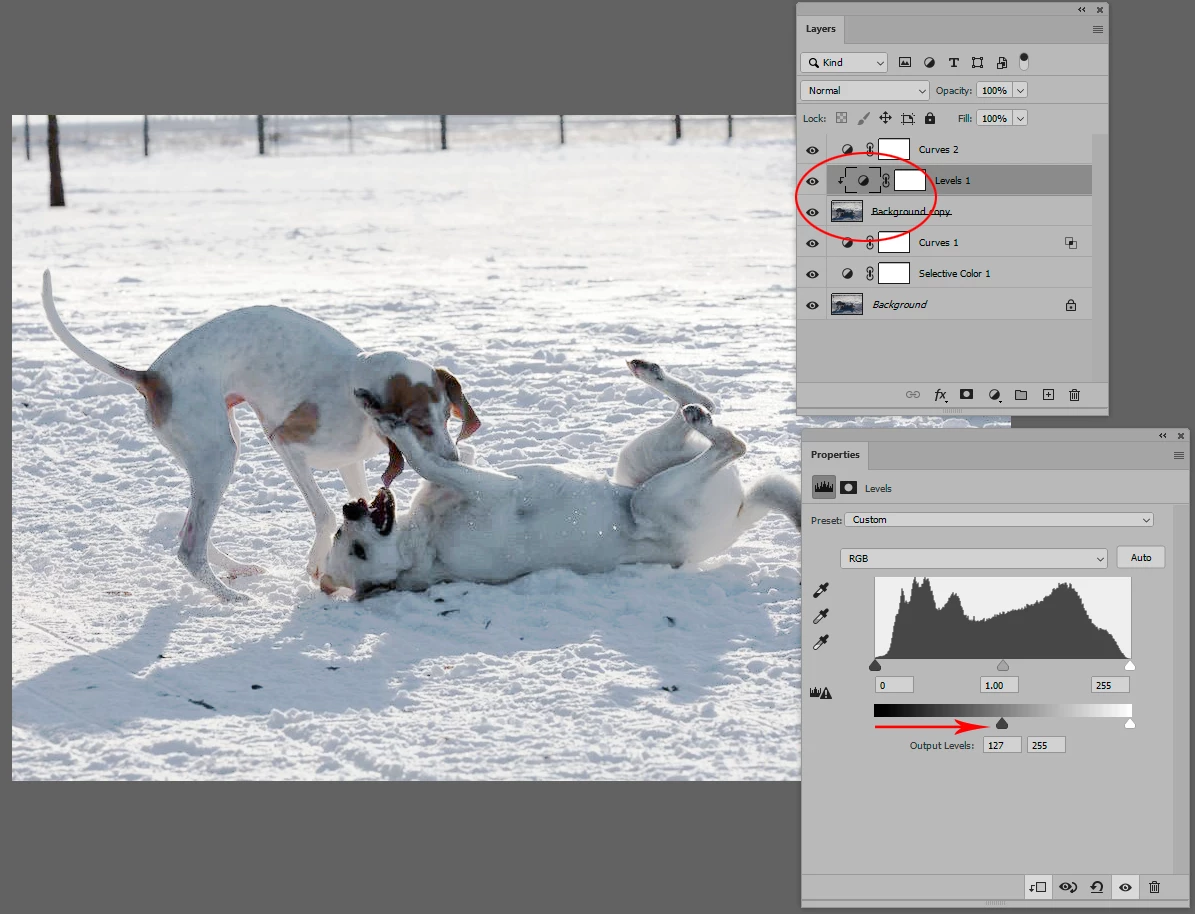
 

Tighten up final contrast with a Curves layer on top.


EDIT: I overdid it here. I'd pull back 50% if it was me. But it shows the principle.


4 replies

mglush
Community Expert
Community Expert
December 29, 2019

Great job!

D Fosse
Community Expert
Community Expert
December 28, 2019

That's right, and that's what I said up there ("I'm not sure I would recommend even trying", "What you should have had, is a flash unit on the camera" etc).


If it was a stationary subject that could be reshot, I'd have left it at that. This was just an emergency rescue operation.

Participant
December 28, 2019

Thank you very much for your quick reply.  I'm impressed what was done given the source file available and brutal lighting condition.  Indeed the shots I took with my back to the sun look much better, I was just curious what could be done with the shot I took looking into the sun.  Some of the images shot that day were about 90 degrees to the sun, these might be salvaged with your technique described.  I'll give it a shot.  Thanks a bunch.  -G

Leslie Moak Murray
Community Expert
Community Expert
December 28, 2019

Even with the good advice already given here, though, the dogs are backlit and that's never going to give a good result for most things.Usually you'd want the light source to be behind you and shining on your subject.

D Fosse
Community Expert
D FosseCommunity ExpertCorrect answer
Community Expert
December 28, 2019

This the most difficult lighting situation imaginable - shot directly into strong sunlight. What you should have had, is a flash unit on the camera. But of course it's unrealistic to walk around with that the whole time.


This is using the full dynamic range of the camera sensor, probably 12-14 full stops, and you will need the full raw data to do anything about this.


I'm not sure I would recommend even trying. It will very quickly look artificial. But if it's an important image and you feel you have to at least try:


First get rid of the strong blue cast from the sky, and then raise the overall exposure to whatever you want. Do this in ACR to get all the data (I just did it with Curves here). It will still inevitably blow out the highlights. Here's a trick to retrieve them: Duplicate the original version, and compress it towards the highlights by dragging the output black slider far to the right. Put this layer on top in Darken blend mode:


Tighten up final contrast with a Curves layer on top.


EDIT: I overdid it here. I'd pull back 50% if it was me. But it shows the principle.