


Participant
August 29, 2025
Answered

Why are colours SO MUCH duller if you change the Mode to CMYK ?

  • August 29, 2025
  • 2 replies
  • 632 views

I know, I know, CMYK colour space is smaller than sRGB so some colours look dim/dull yada yada yada. I'm well aware of  that, but that's not the issue I'm facing.


So I'm working in a Photoshop file and forgot to set CMYK colour space at the beginning. When I go to Image > Mode and set it to CMYK the colours looks CRAZY dull, almost as if there's a white filter with 50% opacity set over the whole image. It doesn't make sense. I have experience in printing and I've seen what printers can do, but my orange colour I'm seeing looks more like gray than orange. When I go to websites that convert HEX to the closest CMYK colour my orange looks SO MUCH more vibrant than whatever I'm seeing in Photoshop.


But, if I don't do that, and instead go to Edit > Convert to Profile and set CMYK there than the image looks vibrant.  And if I go to create a new file with CMYK at the start, upload my exported png there that the colours also look vibrant, yet it's CMYK mode from the start.


What is happening? Shouldn't  Image > Mode be the right way to convert colour profile? Why then there is such a huge difference in colors when I do that compared if I convert the profile in Edit > Convert to Profile or create a new file with CMYK already set? It makes zero sense!

Correct answer D Fosse

You should always use Convert to Profile, and then convert to the specific CMYK profile that corresponds to the actual press conditions. You always need to ask the printer what CMYK profile to use.


Image Mode just converts to whatever you may have as your working CMYK.


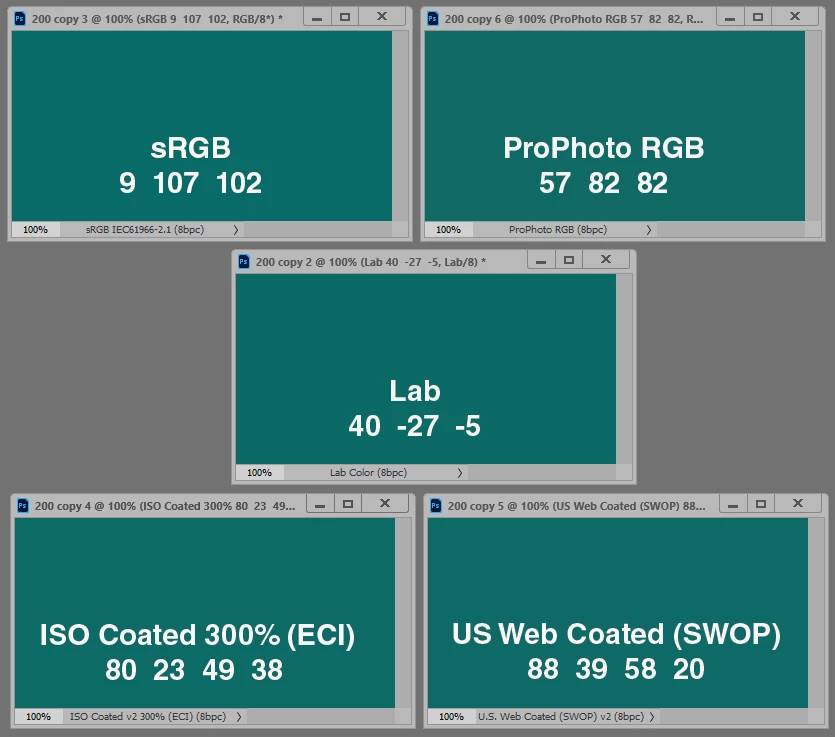
There is no generic universal "CMYK". And there is certainly no universal conversion table/calculator - those who offer one don't understand how this works. It depends on the profile used. Every CMYK profile describes an offset press calibrated to a certain standard, using certain standard inks on certain paper stock. The limitations of CMYK are the limitations of physical ink on paper.


If you're working directly in CMYK it's very easy to exceed maximum ink limit (TAC), resulting in smearing or drying problems (or the printer returning your file). This is avoided by working in RGB and then converting to target CMYK. The ink limit is built into the profile and accounted for in the conversion.


2 replies

Conrad_C
Community Expert
Community Expert
August 29, 2025

Another way to put it…


The colors after applying Image > Mode > CMYK Color should be the same as after applying Edit > Convert to Profile, if the CMYK Working Space in Edit > Color Settings is the same as the CMYK profile you choose in Edit > Convert to Profile. (Use Black Point Compensation and Use Dither also need to be set the same way in both places.)


If the CMYK Working Space in Edit > Color Settings does not match your delivery requirements to the press, then to get the right conversion you should either change the CMYK Working Space before using Image > Mode  >CMYK Color, or you can just choose Edit > Convert to Profile and choose the correct output profile there.


The danger of just using Image > Mode > CMYK Color without checking if the CMYK Working Space profile it will use is correct for your current output job is precisely why Photoshop shows the message in the picture below (if Don’t Show Again hasn’t been clicked).


D Fosse
Community Expert
D FosseCommunity ExpertCorrect answer
Community Expert
August 29, 2025

You should always use Convert to Profile, and then convert to the specific CMYK profile that corresponds to the actual press conditions. You always need to ask the printer what CMYK profile to use.


Image Mode just converts to whatever you may have as your working CMYK.


There is no generic universal "CMYK". And there is certainly no universal conversion table/calculator - those who offer one don't understand how this works. It depends on the profile used. Every CMYK profile describes an offset press calibrated to a certain standard, using certain standard inks on certain paper stock. The limitations of CMYK are the limitations of physical ink on paper.


If you're working directly in CMYK it's very easy to exceed maximum ink limit (TAC), resulting in smearing or drying problems (or the printer returning your file). This is avoided by working in RGB and then converting to target CMYK. The ink limit is built into the profile and accounted for in the conversion.


Participant
August 29, 2025

Thank you a lot! Very insightful and helpful.

Stephen Marsh
Community Expert
Community Expert
August 29, 2025

@Gleeful_appreciator5E84 - which begs the question:  what CMYK was your working CMYK set to in colour settings, what rendering intent etc.