
Participating Frequently
February 7, 2018
Question

Why are there Brush Icons on Kyle's Brushes?

  • February 7, 2018
  • 2 replies
  • 2065 views

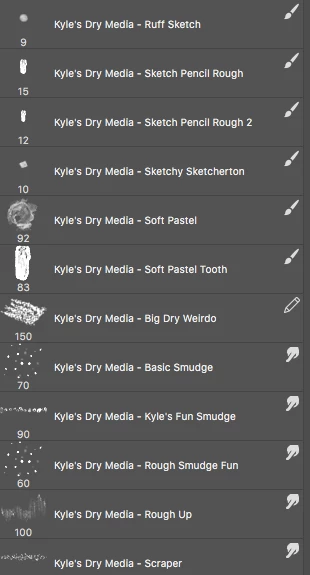
I noticed that on all the sets of Kyle's brushes, there is a specific brush icon in the upper right-hand corner and it seems I can only use the associated brush of that icon.

For instance, some have the regular brush tool icon, I can't switch it to the Mixer brush tool, nor can I change the settings. Is it locked? How do I unlock them? What does that icon indicate?

Thanks!
    This topic has been closed for replies.

    2 replies

    davescm
    Community Expert
    Community Expert
    February 7, 2018

    Hi

    In CC2018 brushes can be saved with our without an associated tool preset. The icon shows where a brush is saved with the tool and will automatically switch to that tool if selected.

    In the current release, you can load the brush without changing tools by holding down Ctrl+Alt  (Cmd+Opt on Mac) and clicking on the brush

    Dave

    JJMack
    Community Expert
    Community Expert
    February 7, 2018

    Someday I might start using CC 2018....

    JJMack
    JJMack
    Community Expert
    Community Expert
    February 7, 2018

    It would help of you showed which OS which PS, which panel, Which panel options, which add-on your using.  Looks like you showing part  of a tool presets panel where all tools preset are shown. That I do not recognize the format of.  Are you using CC 2018 or some Add-on.  In my Photoshop Tool preset panel I see the tool icon on the left and no thumbnail.   You seem to have a thumbnail on the left and a tool icon on the right

    JJMack
    Participating Frequently
    February 8, 2018

    I agree, that would be most helpful JJMack!

    Mac OS 10.11.6 El Capitan

    CC2018

    Brushes Palette

    Kyle's dry_media folder

    No add on or plug-ins. Just loaded the abr file using the preset manager.