Inspiring
August 2, 2018
Answered

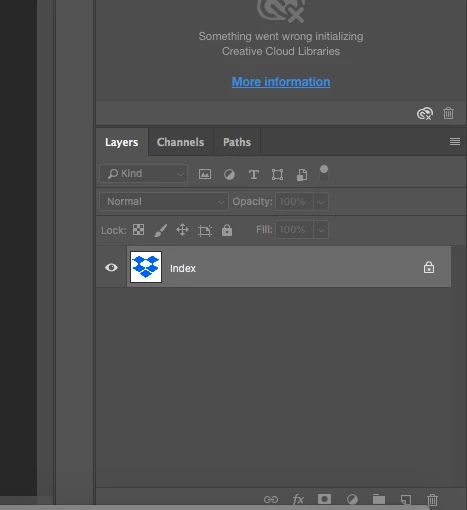
Why can't I unlock the layer?

  • August 2, 2018
  • 2 replies
  • 1399 views

Why can't I unlock the layer?

This topic has been closed for replies.
Correct answer sharp_hands16B8

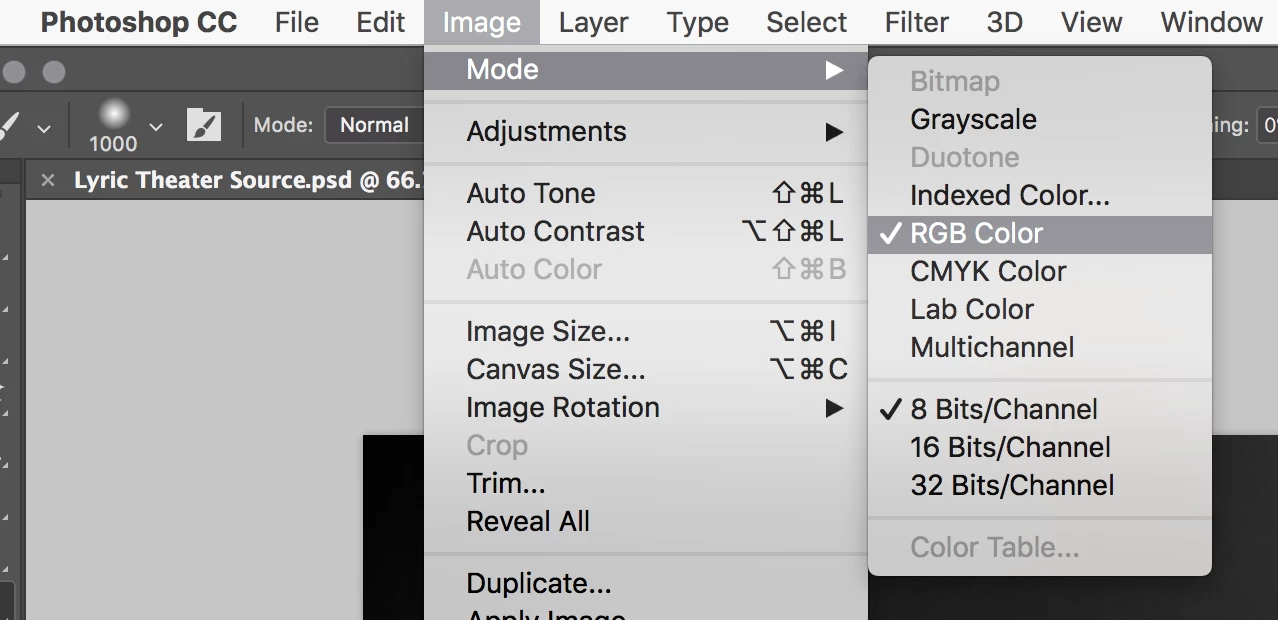
This is an easy one thankfully. You are in the Index Color Mode which doesn't allow layers. It's often used for GIFs, etc.

Go up to the menu and choose Image > Mode > RGB and now you'll have access to unlocking the background layer by converting it into a normal layer (just double click on it then)
2 replies

sharp_hands16B8
Community Expert
sharp_hands16B8Community ExpertCorrect answer
Community Expert
August 2, 2018

This is an easy one thankfully. You are in the Index Color Mode which doesn't allow layers. It's often used for GIFs, etc.

Go up to the menu and choose Image > Mode > RGB and now you'll have access to unlocking the background layer by converting it into a normal layer (just double click on it then)

Inspiring
August 2, 2018

Thank you. I'm glad it was easy.

sharp_hands16B8
Community Expert
Community Expert
August 2, 2018

...at least it was this time.

JJMack
Community Expert
Community Expert
August 2, 2018

You provide no information about your document and about how you are editing it. You show Photoshop Layers palette and part of the library palette where something went wrong.

Supply pertinent information for quicker answers

  • The more information you supply about your situation, the better equipped other community members will be to answer. Consider including the following in your question:
  • Adobe product and version number
  • Operating system and version number
  • The full text of any error message(s)
  • What you were doing when the problem occurred
  • Screenshots of the problem
  • Computer hardware, such as CPU; GPU; amount of RAM; etc.
JJMack