

Jimmy Papas
Inspiring
April 21, 2022
Answered

Why do Photoshop colors in an sRGB document look like CMYK (washed out)?

  • April 21, 2022
  • 2 replies
  • 647 views

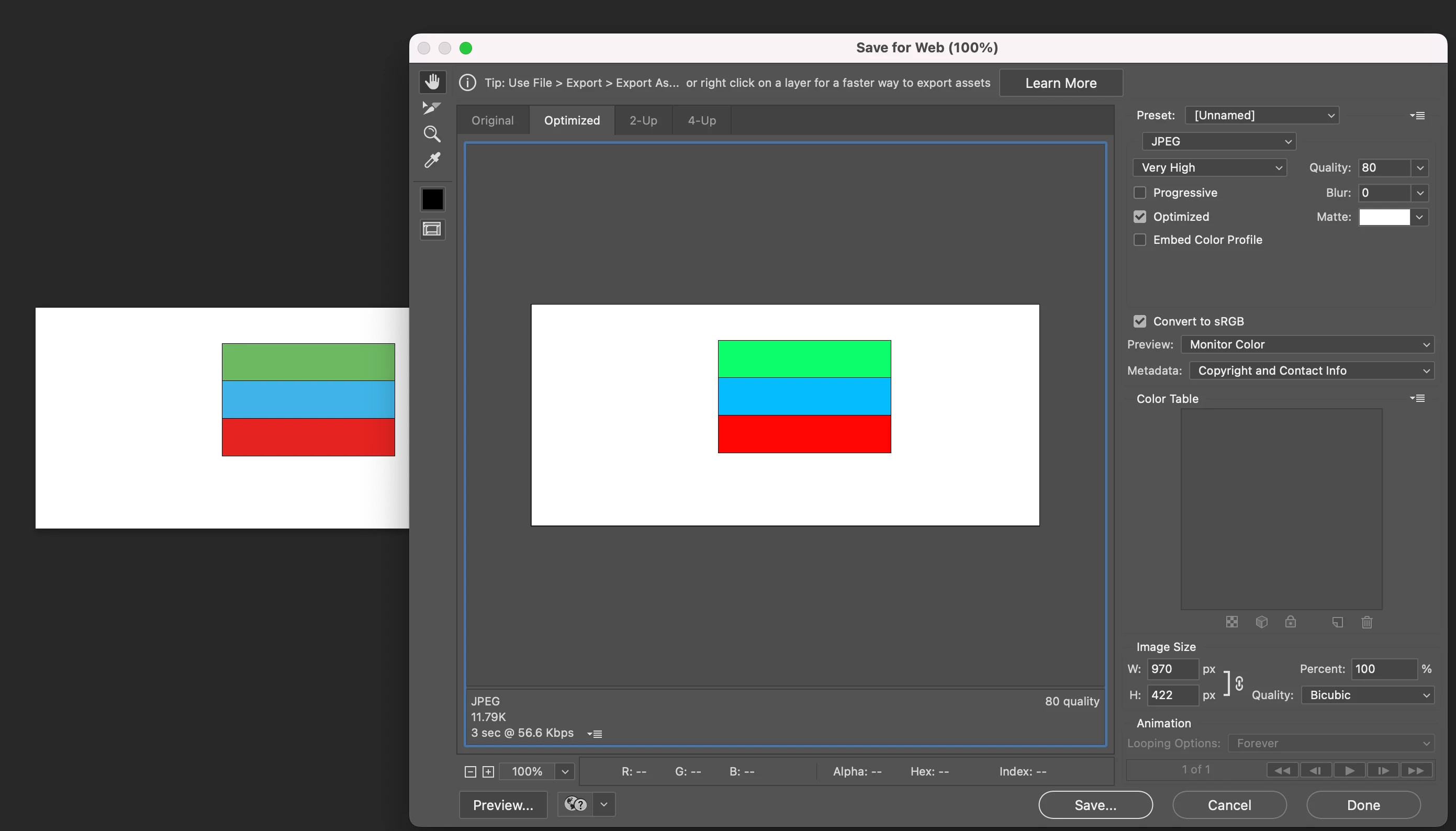
It's only when I click "save for web" that the true "bright" RGB colors show. But why don't the real colors show while I'm working? 

And no the View>Proof Colors (Ctrl+Y) is not selected.


This topic has been closed for replies.
Correct answer c.pfaffenbichler

You seem to misunderstand Color Management because previewing at »Monitor Colors« seems pretty much nonsensical. 


Sorry, you mentioned the color space in the title. (edited)


Please set the Status Bar to »Document Profile« and post screenshots. 

2 replies

davescm
Community Expert
Community Expert
April 21, 2022

Short answer - c.pfaffenbichler is correct.


Longer explanation:

Each document should have a colour profile which colour managed applications use (along with the monitor profile) to convert colour values in the document to the colour values sent to the monitor in order that they show correctly. That conversion happens in the background whilst you are viewing documents and editing in Photoshop.


Using Export -Save for Web you should be doing three things:

a. Embedding a profile (which you are). This means that other colour managed applications will display your exported document correctly.

b. Converting to sRGB (which you are not). This is to get it close to an old internet standard which could display closer to intended on non colour managed applications with standard displays. Those with newer wide gamut displays should always be using colour managed software.

c. Your preview should be set to 'Use Document Profile'. (which it is not). Setting it to monitor profile turns off colour management and shows what the document will look like on your system if using non colour managed applications, which if you have a wide gamut display you should never do.


Dave


c.pfaffenbichler
Community Expert
c.pfaffenbichlerCommunity ExpertCorrect answer
Community Expert
April 21, 2022

You seem to misunderstand Color Management because previewing at »Monitor Colors« seems pretty much nonsensical. 


Sorry, you mentioned the color space in the title. (edited)


Please set the Status Bar to »Document Profile« and post screenshots.