
Participant
August 29, 2022
Answered

Why do you force users to use the cloud?

  • August 29, 2022
  • 3 replies
  • 931 views

Everytime I want to save I'm prompted to do it on the Creative Cloud.
I don't want that, I don't want this as a default, how do I turn this off ?


And why is there about 20 adobe programs running in the background at any given time?
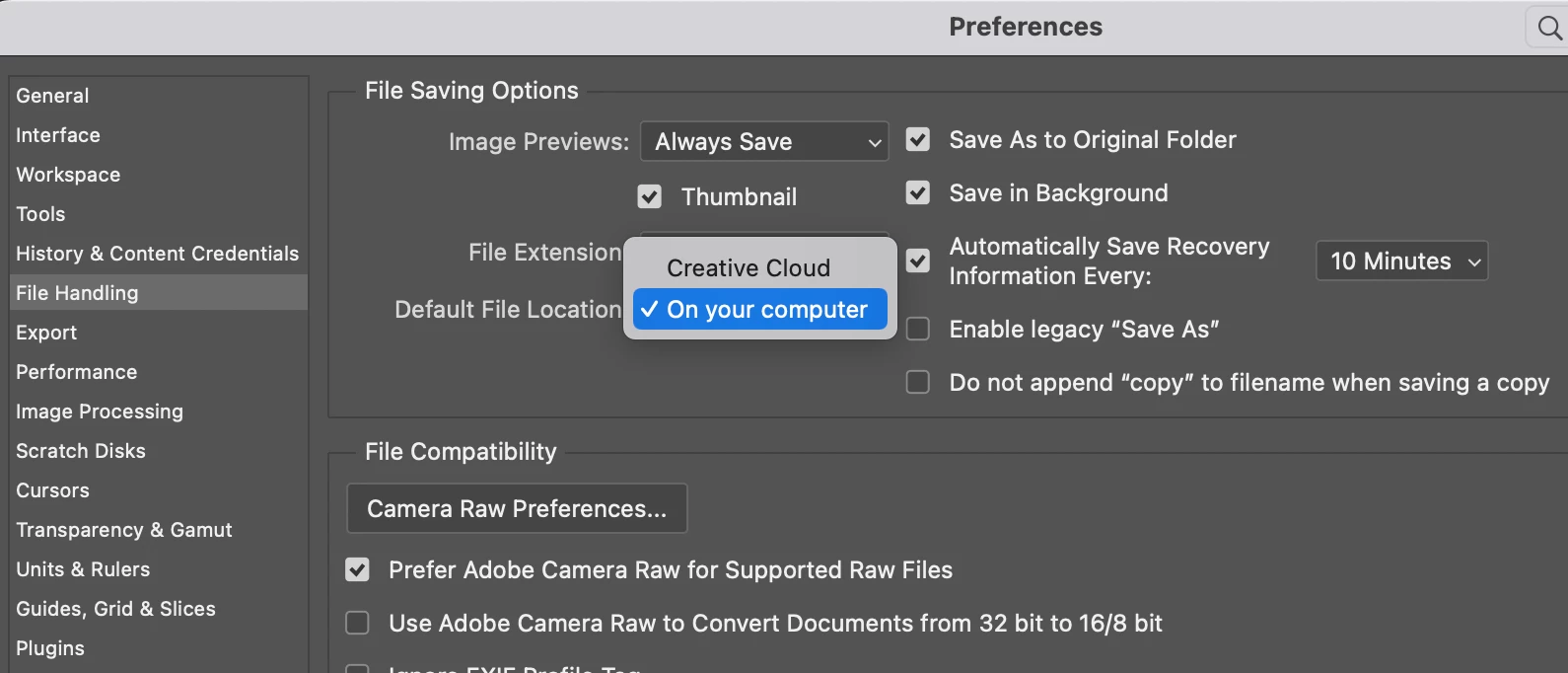
Correct answer Derek Cross

Change saving location in preferences and close the applications you don't want open.


3 replies

Participant
July 8, 2024

Absolutely just as disgusted that the idiots at Adobe think its ok to force their garbage "cloud" nonsense onto customers. NO adobe,  I will NEVER want you to store MY documents ANYWHERE, and its beyond IDIOTIC, irresponsible, and just plain STUPID that a company which used to provide quality software is now just another cheap subscription service with no options. Back when Photoshop was real (BEFORE the cloud crap was born), I could actually install the software onto my computer without it being attached to some low grade cloud crap. Now the geniuses at adobe are only concerned with connecting to your credit card once  a month and storing your files for you so they can charge you to acess YOUR FILES. Ridiculous. This is why so many people still buy/sell bootleg photoshop copies on laptops (they keep them offline so the key is never questioned---dont need to access the internet with a copy of the REAL photoshop...didnt come with cloud garbage!)

Derek Cross
Community Expert
Community Expert
July 8, 2024

Other views are available.

Participant
December 28, 2022

A professional solution from Adobe to handle such changes would be to have a box option to revert to the previous user setting (not cloud) right on the screen the first time when the "update" is implemented as in, when the user gets that ennoying "save to cloud and figure it out on your own if you don't like it" screen. No long term client likes to be belittled and be left figuring out imposed changes on their own, which can from the number of time this issue comes back be a real drain of time for NO reason at all.  

Derek Cross
Community Expert
Derek CrossCommunity ExpertCorrect answer
Community Expert
August 29, 2022

Change saving location in preferences and close the applications you don't want open.


SequelleAuthor
Participant
September 18, 2022

I don't want to open the task manager and kill every single adobe apps running in the background each time I start my computer. Yes, everything is off, I purposfully selected to NOT run Adobe CC on startup and yet it's always on my task manager despite not being open.

D Fosse
Community Expert
Community Expert
July 8, 2024

If you take a closer look you'll see these Adobe processes are on call. They're not consuming any computer resources and are basically just sitting there until called. They have absolutely no impact on computer performance, so there's no reason to get worked up.