
Inspiring
November 7, 2020
Answered

Why does editing a lightroom photo in photoshop DRASTICALLY increase the file size?

  • November 7, 2020
  • 2 replies
  • 891 views

Hi all,

I was trying out the sky replacement in the latest PS update. I had several tiff files in LR. I had LR open them up in photoshop to replace the sky. All I did was replace the sky, and then saved the files. The original lightroom tif files were 18.5 meg. The files I edited in PS are all around 150meg


Is photoshop the one increasing the file size? Or is LR doing that when it sends a copy of the tif file to ps?
This topic has been closed for replies.
Correct answer D Fosse

TIFF fully supports all kinds of layers.


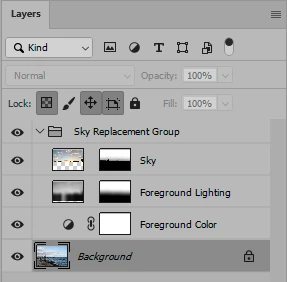
Here's a random flat test TIFF where I used sky replacement. This is the resulting layers panel:


In this case the file size on disk went from 202 MB to 1.41 GB.


When I re-flatten this file, the size returns to 202 MB.


A flat file is stripped of a long list of file properties that otherwise increase file size. I'm very used to this size difference between flat and layered files, and I'm not for a second surprised.

2 replies

D Fosse
Community Expert
Community Expert
November 7, 2020

Sky replacement increases file complexity with several new layers, masks and blend modes. That in itself will increase file size many times over. If you flatten and resave, it will go back down to approximately former size (depending on compression options).


Those numbers seem perfectly normal and expected.

merkkAuthor
Inspiring
November 7, 2020

I'm not sure how the layers would matter....tifs are already a flattened image arent they? they don't support layers. If i open the edited file in PS again, there are no layers present.

D Fosse
Community Expert
D FosseCommunity ExpertCorrect answer
Community Expert
November 7, 2020

TIFF fully supports all kinds of layers.


Here's a random flat test TIFF where I used sky replacement. This is the resulting layers panel:


In this case the file size on disk went from 202 MB to 1.41 GB.


When I re-flatten this file, the size returns to 202 MB.


A flat file is stripped of a long list of file properties that otherwise increase file size. I'm very used to this size difference between flat and layered files, and I'm not for a second surprised.

Mylenium
Legend
November 7, 2020

Entirely depends on the TIFF options used. The default is uncompressed, I believe, whereas your source files may have used some compression already.


Mylenium

merkkAuthor
Inspiring
November 7, 2020

both versions are uncompressed