
Participating Frequently
September 19, 2018
Answered

Why does Photoshop not open this EPS file (while Illustrator does)?

  • September 19, 2018
  • 3 replies
  • 45705 views

Photoshop CC 2018, Windows

File I try to open is attached (436800.eps)

I would like to attach this file here, this is not possible? So please ask me for the file.

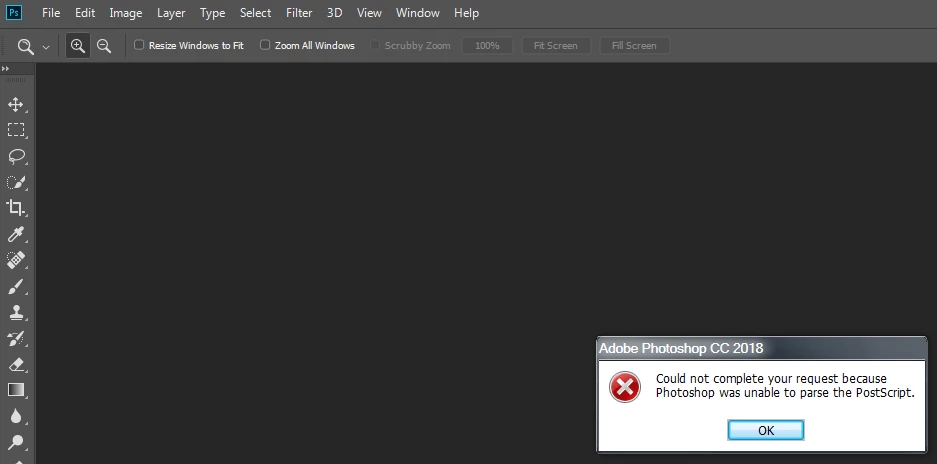
This is the error message shown; when I open same file in Illustrator, it opens without a problem.
Mod Edit: Personal email address removed

Patrick.

This topic has been closed for replies.
Correct answer Akash Sharma

Hi Patrick,


Sorry that you're getting an error message "Could not complete your request because Photoshop was unable to parse the postscript". while opening a . .EPS file in Photoshop.

Could you please let us know the exact version of Photoshop CC you're using?

I'd recommend that you take a look at the discussion below and let us know if that helps:

Error: could not complete your request because photoshop was unable to parse the postscript

Thanks,

Akash

3 replies

Mohit Goyal
Community Manager
Community Manager
November 23, 2021

Hi all,


Take a look at the following article to move designs between Photoshop and Illustrator for different workflow that suits your design objectives: https://helpx.adobe.com/photoshop/using/move-designs-between-photoshop-illustrator.html


Also, if you are looking to work with Illustrator design in Photoshop? See this: https://helpx.adobe.com/illustrator/using/use-illustrator-artwork-in-photoshop.html


Hope it helps.


Thanks,

Mohit

Inspiring
September 20, 2018

This file had been created 04/10/93 using Illustrator 5 and 6 components (see appendix).

It can be rasterized by Photoshop CS2, but not by CS6 (error: unable to parse)

Nothing newer available here!

It can be opened by Illustrator CS2 or CS6, with or without font update.

It can be previewed in high quality by InDesign CS2, but not by CS6 (error: limitcheck).

A test by PSAlter (PostScript Editor and Analyzer) indicates a couple of font problems.

Ignoring these, a preview is possible. All fonts are embedded.

With respect to the age of this file, a transformation into a newer version is highly

recommended!

Best regards --Gernot Hoffmann

%!PS-Adobe-3.0 EPSF-3.0

%%Creator: Andes Plotprogram

%%BoundingBox: 0 0 250 250

%%HiResBoundingBox: 0 0 250 250

%%Plotlim: 0 0 8820 8820

%%DocumentProcessColors: Cyan Magenta Yellow Black

%%DocumentFonts: Courier

%%+ Helvetica

%%+ Helvetica-Bold

%%+ ArialMT

%%DocumentSuppliedFonts: Courier

%%+ Helvetica

%%+ Helvetica-Bold

%%+ ArialMT

%%DocumentSuppliedResources: procset Adobe_level2_AI5 1.2 0

%%+ procset Adobe_typography_AI5 1.0 1

%%+ procset Adobe_ColorImage_AI6 1.3 0

%%+ procset Adobe_Illustrator_AI5 1.3 0

%%+ procset Adobe_cshow 2.0 8

%%+ procset Adobe_shading_AI8 1.0 0

%AI5_FileFormat 4.0

%AI3_ColorUsage: Color

%AI7_ImageSettings: 0

%%CMYKProcessColor: 1 1 1 1 ([Registration])

%%AI6_ColorSeparationSet: 1 1 (AI6 Default Color Separation Set)

%%+ Options: 1 16 0 1 0 1 1 1 0 1 1 1 1 18 0 0 0 0 0 0 0 0 -1 -1 0 0 0 0 1 0 0 0 0 1 0 0 0 0 0 1 2 3 4

%%+ PPD: 1 21 0 0 60 45 2 2 1 0 0 1 0 0 0 0 0 0 0 0 0 0 ()

%AI3_DocumentPreview: Header

%AI5_ArtSize: 1296 1296

%AI5_ArtFlags: 0 0 0 1 0 0 1 0 0

%AI5_TargetResolution: 800

%AI5_NumLayers: 1

%%PageOrigin:0 0

%%EndComments

%%BeginProlog

%%BeginResource: procset Adobe_level2_AI5 1.2 0

%%Title: (Adobe Illustrator (R) Version 5.0 Level 2 Emulation)

%%Version: 1.2 0

%%CreationDate: (04/10/93) ()

%%Copyright: ((C) 1987-1996 Adobe Systems Incorporated All Rights Reserved)

...

About the history of Adobe Illustrator:

Adobe Illustrator – Wikipedia

Akash Sharma
Akash SharmaCorrect answer
Legend
September 19, 2018

Hi Patrick,


Sorry that you're getting an error message "Could not complete your request because Photoshop was unable to parse the postscript". while opening a . .EPS file in Photoshop.

Could you please let us know the exact version of Photoshop CC you're using?

I'd recommend that you take a look at the discussion below and let us know if that helps:

Error: could not complete your request because photoshop was unable to parse the postscript

Thanks,

Akash

Participating Frequently
September 19, 2018

19.1.5

I will read this discussion,