RobertRamos
Participant
October 9, 2018
Answered

Why is 'auto-blend" grayed out?

  • October 9, 2018
  • 3 replies
  • 2990 views

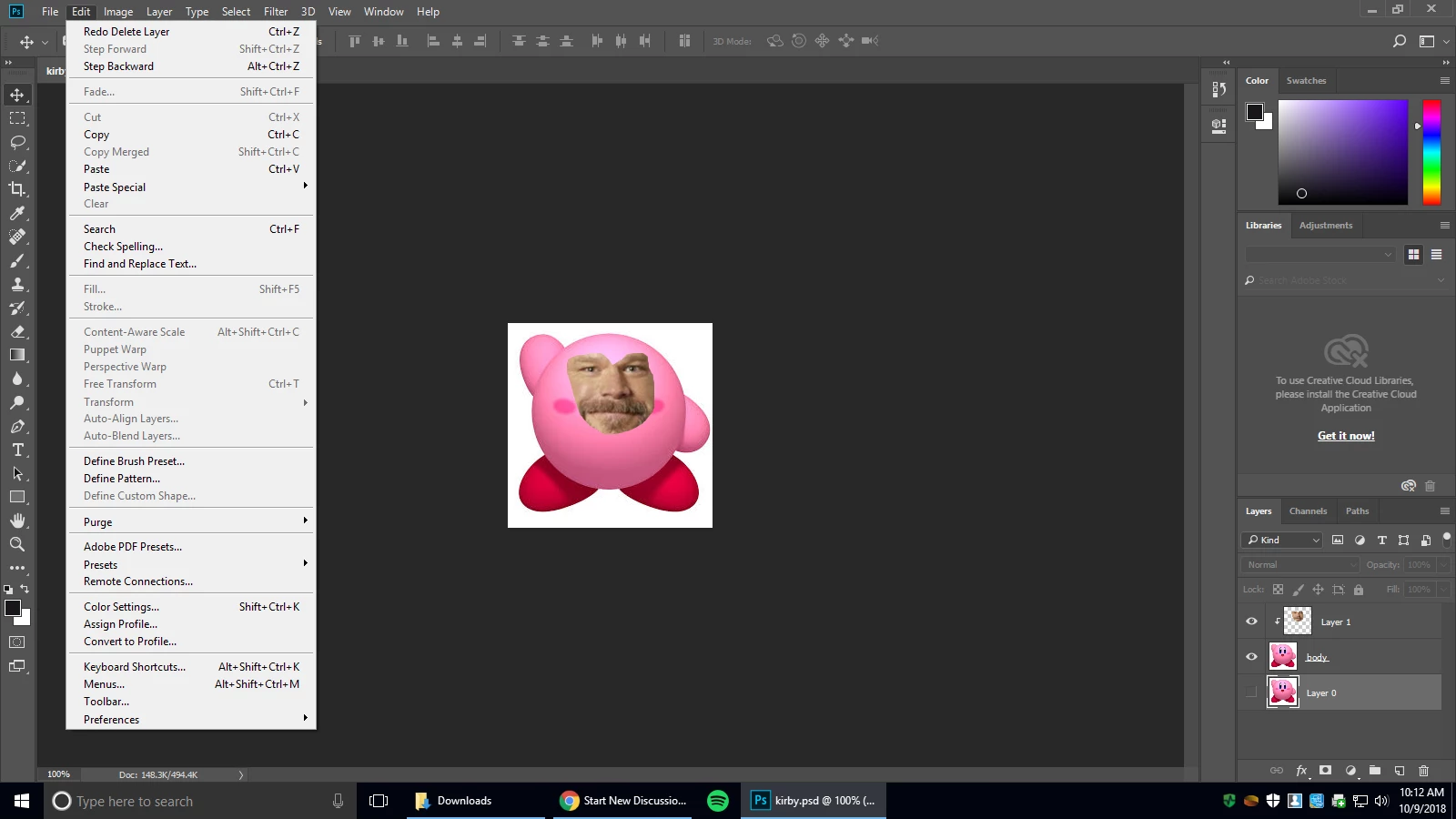
I'm doing a project for class where we incorporate "auto-blend" in our pictures but it won't let me use the feature.

Here's a picture of what it looks like.
    This topic has been closed for replies.
    Correct answer c.pfaffenbichler

    Three is only one Layer selected and that one is not visible.

    3 replies

    Participant
    July 19, 2020

    I'm also facing the same issue of Auto-blend layers and Auto-align layers. I'm using Photoshop CS6 (64 bit) on Windows 8.1 Pro version of my Laptop. 

    Muqqarib Hassan
    Inspiring
    October 9, 2018

    Yes. For any work that you want to do Make sure you have select that layer on which you want to work on and then make sure is it visible or not. or check that too is that layer is locked or not. If locked unlock it.

    Thanks.

    c.pfaffenbichler
    Community Expert
    c.pfaffenbichlerCommunity ExpertCorrect answer
    Community Expert
    October 9, 2018

    Three is only one Layer selected and that one is not visible.