
Participant
December 1, 2019
Answered

Why is the outline on a layer hidden under lower layer?

  • December 1, 2019
  • 3 replies
  • 494 views

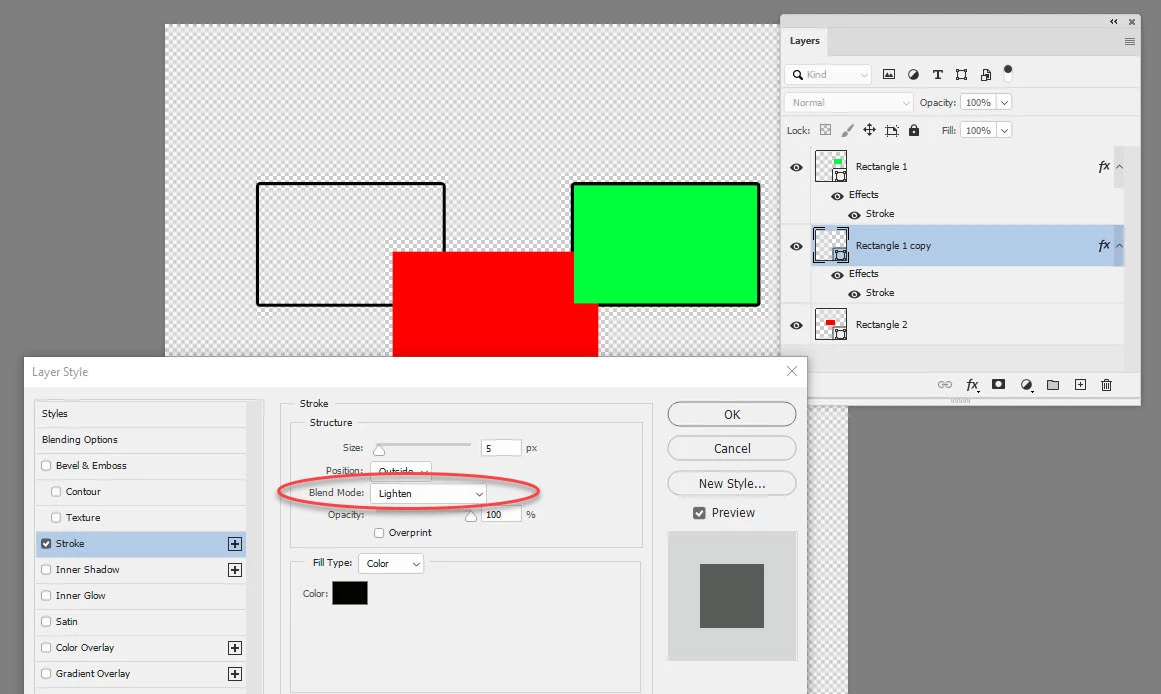
I came accross strange behavior of Photoshop after the last update. It seems, it renders layer outline (set through layer effects) as if it was lower in layer hierarchy, than it actually is. Does anyone have any idea, what could I be doing wrong? See the video for demonstration.
 

This topic has been closed for replies.
Correct answer davescm

Check the blend mode of your stroke. Setting it to Lighten, Screen, Color Dodge, Linear Dodge, Lighter Color, Overlay, Soft Light, Hard Mix - will all show that using the black stroke and solid colour combinations you are using.


Dave

3 replies

davescm
Community Expert
Community Expert
December 11, 2019

You're welcome 🙂

It's handy when you know it is there, but puzzling if you forget.

Dave

davescm
Community Expert
davescmCommunity ExpertCorrect answer
Community Expert
December 11, 2019

Check the blend mode of your stroke. Setting it to Lighten, Screen, Color Dodge, Linear Dodge, Lighter Color, Overlay, Soft Light, Hard Mix - will all show that using the black stroke and solid colour combinations you are using.


Dave

vinovakAuthor
Participant
December 11, 2019

Can I really be that stupid? Yes I can! 😄 That's it! I did not realize effects have it's own blending mode. Thank you so much, "problem" solved!

Chuck Uebele
Community Expert
Community Expert
December 1, 2019

I'm not seeing that. Does this happen with "Legacy Compositing" checked in the preferences? They are trying tup update how PS composites images, so there have been numerous issues with blending and things like this?

vinovakAuthor
Participant
December 11, 2019

Legacy Compositing gives the same result and it's still there, even after the last update.