Known Participant
March 10, 2017
Answered

Why is there no option to lock panels? [PS 2017]

  • March 10, 2017
  • 5 replies
  • 1468 views

How come Photoshop CC doesn't have an option to lock the various panels in place?  I find I often undock panels when I simply meant to expand them.  I realise I can simply reload my saved workspace, but an option to lock the panels would save having to do that.  I've used CorelDraw for years, and it's always had an option to lock the toolbars in place. Even Windows lets you lock the taskbar, so I presume the tech behind that isn't difficult to achieve.
This topic has been closed for replies.
Correct answer Jeff Arola

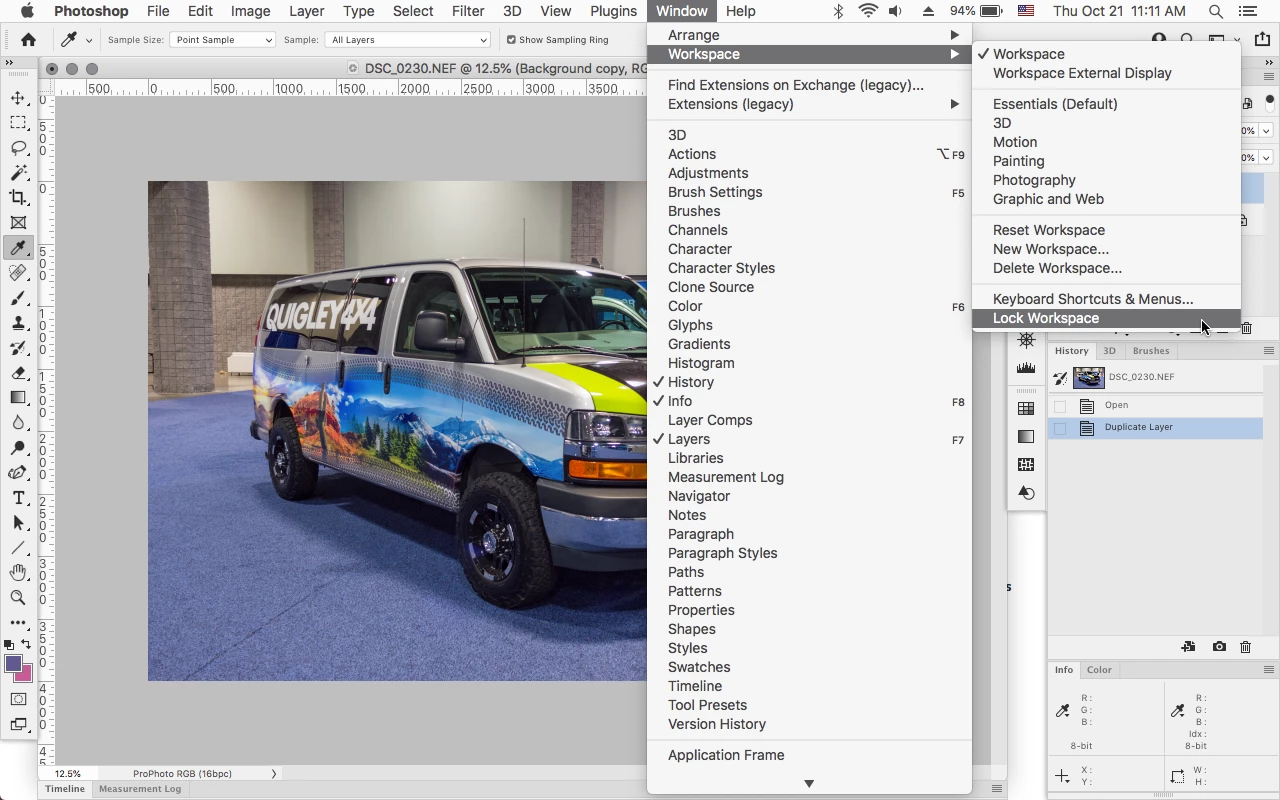
As of a few versions ago photoshop panels can now be locked by going to

Window>Workspace>Lock Workspace.


5 replies

Jeff Arola
Community Expert
Jeff ArolaCommunity ExpertCorrect answer
Community Expert
October 21, 2021

As of a few versions ago photoshop panels can now be locked by going to

Window>Workspace>Lock Workspace.


Trevor.Dennis
Community Expert
Community Expert
October 22, 2021

That's new to me Jeff.  Nice one.   Not that I'd ever lock my workspaces, but it's good to know.

Trevor.Dennis
Community Expert
Community Expert
October 21, 2021

Save a custom workspace or two. Remember you can save custom toolbar and keyboard shortcuts with a custom workspace. I find this incredibly useful as it allows you to reuse shortcs according to context.

Record a short Action that selects, and resets your workspace. Use one of the Function keys to trigger it (see note below)

You can now mess up your workspace to your heart's content, and make it tidy again with a single key press.  This is especially useful for folk like myself who are forever rearranging panels to take screen shots for forum answers.


Note:  Unless you are stuck for screen space, like when using a notebook, the Function keys are way too valuable to waste on their default shortcuts.  I think F1 is the only one that's hard coded.  The rest can be used to trigger actions or as normal shortcuts.  You might find that other apps prevent you using Function keys for Photoshop shortcuts.  I use F2 to toggle Lazy Nemui Pro on and off for instance.


Legend
October 21, 2021

Because Adobe is a HUGE TIME-WASTER. 


Just an artist who feel like this [removed] has take forever to get what's in my head out into reality. Many many avoidable characteristics of this program, but it's like they kept it the same since 1992. 

jane-e
Community Expert
Community Expert
October 21, 2021

@One&Done wrote:

Because Adobe is a HUGE TIME-WASTER. 


It's unclear if your comment is about locking panels and resetting workspaces in Photoshop, which is the focus of this thread. If it is about something else, please start a new thread and be more specific about your issue.


~ Jane


jane-e
Community Expert
Community Expert
March 11, 2017

You can fill out a feature request here:

http://www.adobe.com/products/wishform.html

Dave AddoAuthor
Known Participant
March 11, 2017

Thanks!

gener7
Community Expert
Community Expert
March 11, 2017

This goes beyond what the User 2 Users forums can do, so the Photoshop Feedback area is the best bet.

Photoshop Family Customer Community