
why the color in images taken by screen capture are different? Mac & Windows & Display
Hi professional and experts,
I hope this question is not too baby level.
I got a Macbook connected to a External Display, have another Thinkpad notebook.
The Macbook color profile is Color LCD, the Display profile is S27F350, have no idea on Thinkpad.
Recently, I found this:
An original image displays different in Display (Color 1) and Macbook (Color 2), which is caused by the different color profile.
Then, I made 2 screen captures based on same 1 physical image file:
Screen Capture 01 is while the image displaying in Display
Screen Capeture 02 is shile the image displaying in Macbook
Then the 2 screen captures are sent to Thinkpad via an IM (instant messge) tool.
Then it's found:
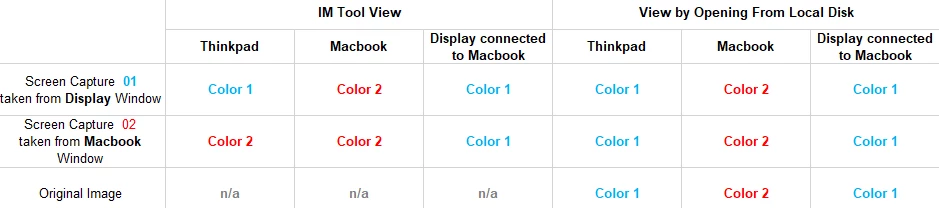
1. When click the 2 images via IM tool from Macbook, both of them display in same color on each of screen: 01 and 02 display same color in External Display (Color 1), 01 and 02 diplay another same color in Macbook screen (Color 2).
2. When click the 2 images via IM tool from Thinkpad, they are displaying 2 different colors: one looks same to it was displaying in Display (Color 1), another one looks same to it was displaying in Macbook (Color 2).
3. After saving the 2 images to local dis from Thinkpad, viewing from Windows Photo, they look same color (Color 1).
Could you please help to clarify the reason?
My question is:
1. In IM tool, if Thinkpad view 2 images at 2 colors, in Macbook or in Display, the 2 images shall be displayed to 2 colors on each screen too. Otherwise, Thinkpad and Macbook and Display shall all display 2 images as same color.
2. Why in Thinkpad, the view of 2 images in IM tool display to 2 colors while view of the 2 images from Windows Photo display to 1 color?
Attached video record for better understanding.
Thanks in advance for your inputs.
 AdChoices