Participant
June 28, 2023
Question

Why the text doesn't follow the parallel lines perfectly ?

  • June 28, 2023
  • 3 replies
  • 226 views

Hello 🙂


I am not sure how to title that problem, so sorry for the weird title.
I have created parallel lines.
and I want the text that I type to follow well the lines.

Here the image about the result : 
(the rectangle is the limit)
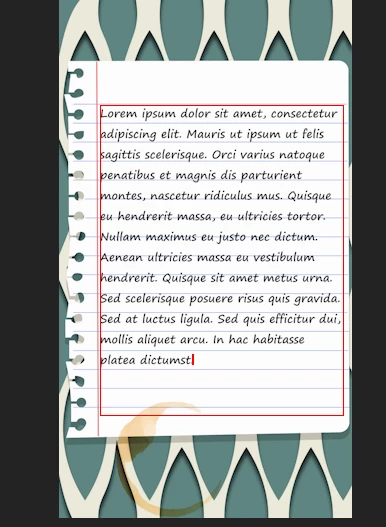
I have "placed" my text, then I chose a specific "leading" value to adjust my text just above the lines.
Maybe I am wrong but it means that distance between lines right ?

But more the text has lines, more it's out of lines.
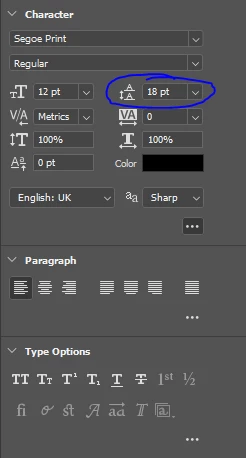
 

The original problem was for Adobe Premiere, but I see it's same on Photoshop.
Is it because the font, ome letters creates the mess ?!


This topic has been closed for replies.

3 replies

c.pfaffenbichler
Community Expert
Community Expert
June 30, 2023

If the issue is not resolved yet please provide the file. 

mglush
Community Expert
Community Expert
June 29, 2023

You are correct--Leading is the space from baseline of type to baseline of type. And your leading is off. Try putting your first line of type directly on the top line and then you will see that the lines crawl downward just a little bit. By placing your first line of type on the first line, then you can adjust the type so that every other line lines up on the succeeding line. Then once you get the leading correct, then move your type into position between the line.


If the lines themselves are slightly off, this might also account for the issue. You can always select one line of type and manually adjust the leading in the paragraph by increasing or decrerasing the leading for that one line. The keyboard shortcut is Alt-Up or Down arrow.


Michelle

Trevor.Dennis
Community Expert
Community Expert
June 28, 2023

Try resetting the Type tool, and then adjusting the font size rather than the leading.  Note: if you are importing existing text, then there might be an issue embedded in that. You can test that by allowing a Tpye window to auto populate after resetting, and see how it compares with the imported text.